Real-Time Recommendations: How ZoomInfo Reached 50x Peak Throughput

A ZoomInfo user opens a company's profile and expects a short list of the right people to contact there, ready the moment the page appears. Behind that view, one request fans out into several parallel Pinecone operations (such as fetch, list and query) against a store of more than 390 million contact embeddings.
Then a reranking model orders what comes back. Now multiply that by every user at peak.
On June 24, 2026, Keith Corbalis, Engineering Manager at Pinecone, who was the lead engineer on Dedicated Read Nodes, hosted Tamiro Scholer, Senior Data Scientist at ZoomInfo, for "How ZoomInfo Scaled Real-Time Recommendations with Pinecone." They covered when on-demand or Dedicated Read Nodes fits a workload, and how ZoomInfo's Applied AI team took contact recommendations from an offline batch job to real-time search over more than 390 million vectors.
Peak throughput rose 50x, and no single change did it. The bottlenecks showed up in order. First the search scope, then the client library, and only then the database. The first two were in ZoomInfo's own design and code.
This post was adapted from Keith Corbalis and Tamiro Scholer's webinar How ZoomInfo Scaled Real-Time Recommendations with Pinecone. Here's the full replay:
What ZoomInfo Built
ZoomInfo serves one retrieval engine through three surfaces:
- Contact lookalikes. A salesperson has a few reference contacts, people who were good to engage on past deals, and wants more like them. ZoomInfo embeds contact profiles, so finding a similar contact becomes a vector search.
- Contact recommendations. The user has no specific person in mind, but ZoomInfo knows their usage history, the product they sell and the market they target. A two-tower approach represents the user in one tower and the universe of target contacts in the other. It replaces research that could take users hours of manual searching and filtering.
- Agents. Customers increasingly reach ZoomInfo's data through APIs and MCP, from a chat window during deal planning or a coding agent while building on the data. Vector search has to scale to the throughput agentic workflows demand.
Why use vector search for records you'd expect to keep in a relational database? Some contact fields are structured, like a position or a company. But what defines a contact also includes an unstructured description of the job, the nuances of an industry and the products they're in market for. Finding a contact similar to another one isn't field-by-field matching.
An embedding encodes all of that context at once.
Before Pinecone, ZoomInfo had no vector database. An offline batch job tried to precompute recommendations at scale. It was costly to recompute, and its output went stale as contact profiles changed.
So ZoomInfo set out to serve real-time results over constantly updated vectors. It wanted something it could build quickly without months of refactoring later, and it didn't want to own the tuning of approximate nearest neighbor (ANN) algorithms.
The service-level goal was under one second end to end for lighter loads (under 100 requests per second) and under five seconds for heavier ones.
The team started with off-the-shelf embeddings and about a million records, then scaled to 10 million. It had an end-to-end proof of concept running on the Pinecone Python SDK in under three weeks.
ZoomInfo saw a 2x improvement in relevancy and recall over its prior approach, a more than 50% increase in user engagement and 50x more peak customer requests served.
That last number came in three steps, over a few months.
Scope Each Search to What the Question Needs
For example, a salesperson researching who to contact at a target company has no use for most of the index. Contacts at an unrelated company, or in a different industry, aren't candidates. Searching them spends time and money, and it can only add noise.
ZoomInfo's first scale-up came from that observation. The team partitioned its contact vectors into namespaces and targeted each search at one. A namespace keeps its vectors apart from the rest of the index, and a query runs within a single namespace, so the search never reaches past the domain the question is about.
Scoping helped in two ways. Results got better, because nothing out of scope could rank. They also came back faster, because only relevant records got scanned.
On an on-demand index there's a third effect, which is cost. A query costs 1 read unit (RU) per GB of namespace size, with a minimum of 0.25 RU. A smaller namespace means a cheaper query, so ZoomInfo could scale traffic without scaling cost in proportion.
So before changing anything in the serving layer, ask how much of the vector space each query needs to touch.
Check What Your Client Sends
ZoomInfo's next ceiling looked like a scaling problem. The team scaled out its own pods and added threads and async calls, and the service couldn't take advantage of any of it.
Why wouldn't horizontal scaling help? The code reached Pinecone through LlamaIndex, which at the time didn't support async operations. Every call it made was a synchronous Pinecone API call, however much concurrency sat above it. (That describes LlamaIndex then. Check the version you run.)
ZoomInfo refactored to call the Pinecone SDK directly with async operations. That removed the block on its horizontal scaling, and ZoomInfo puts the gain at roughly another order of magnitude in throughput. The wrapper had hidden a lot of complexity, but ZoomInfo found the SDK just as simple to use without it.
A wrapper that hides the client hides its concurrency model too. A hidden concurrency model costs the most in a service like ZoomInfo's, where one user request fans out into several Pinecone calls.
The Python SDK gives two ways to send requests in parallel:
- Async. SDK versions 6.0.0 and later provide async methods for asyncio, through the
PineconeAsyncioandIndexAsyncioclasses (SDK 8.x and earlier need thepinecone[asyncio]extra). They fit async frameworks like FastAPI and should significantly increase the efficiency of running requests in parallel. - Threads. Pinecone is thread-safe, so synchronous queries can also run in parallel from a thread pool.
When the Rate Limit Is the Ceiling
Consider a 15 GB namespace queried at 150 QPS. Each query costs 15 RU, so the workload needs about 2,250 RU per second. That's over the default on-demand read rate limit of 2,000 RU per second, per index and per namespace.
On-demand indexes serve reads from multi-tenant capacity shared across customers, and rate limits keep that shared fleet healthy. The limits are adjustable, and we work with teams to raise them for a specific workload. But with scope and client fixed, ZoomInfo was making thousands of API calls against its on-demand index, and rate limits became the ceiling.
Dedicated Read Nodes, generally available since April 2026, move reads onto hardware provisioned for one index. Query, fetch and list run on dedicated query executors. All index data stays warm in memory and on local SSDs, and there are no read rate limits.
Reads bill at a fixed hourly rate based on node type, shards and replicas, instead of per read unit.
Writes and storage work and bill the same way in both modes, on the same serverless infrastructure and slab architecture. The difference is whether reads go to a shared pool or to nodes dedicated to one index.
Moving is a single API call, or a toggle in the console. There's no reindexing. Traffic keeps serving from on-demand until the dedicated nodes are ready, then cuts over with zero downtime. The index host stays the same, and so do the queries and the results.
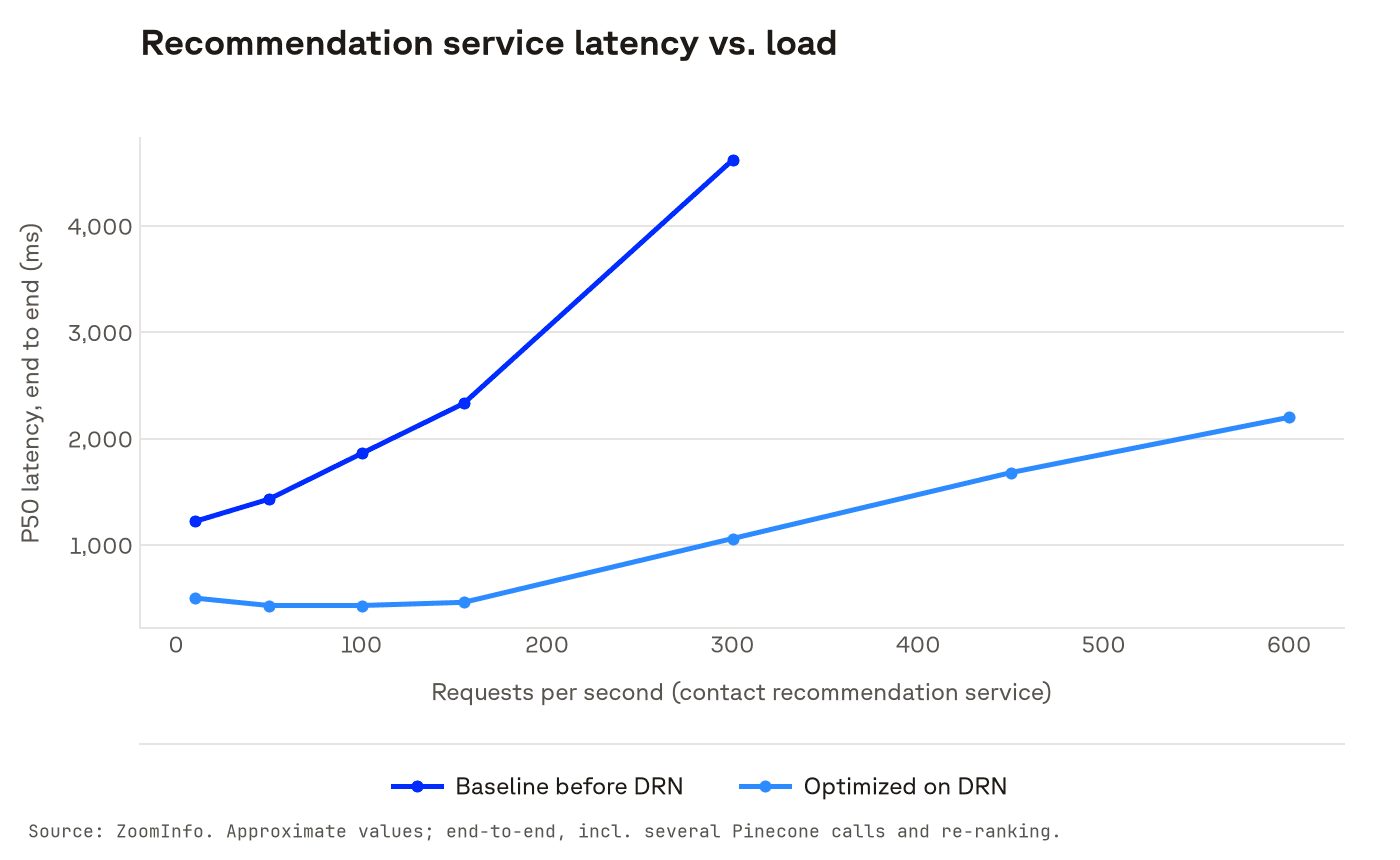
For ZoomInfo, this step took throughput a level higher again. Before, end-to-end service latency pushed past one second under load and climbed as load rose. With the optimized system on Dedicated Read Nodes, latency stayed roughly flat to about 150 requests per second.
Scaling Throughput With Replicas
On Dedicated Read Nodes, the rate limit becomes the nodes' compute, exposed as a CPU metric. That's the signal we tell teams to watch: when CPU starts climbing and latency starts creeping up, add replicas. Replicas scale throughput near-linearly (each replica adds a node per shard), and shards scale storage.
Corbalis's view is that this is a great problem to have. The bottleneck becomes how many replicas to provision, not an architectural issue that's hard to resolve.
There's a second lever. scan_factor and max_candidates let a query trade some recall for lower latency and higher throughput.
Every search trades latency against accuracy, and cost too. We tune the default to the accuracy we think is right for the cost, so these knobs are an advanced feature. For most workloads, we recommend the baseline.
Here's how the two modes compare on reads (see pricing for rates):
| On-demand | Dedicated Read Nodes | |
|---|---|---|
| Read infrastructure | Multi-tenant compute shared across customers | Provisioned query executors dedicated to one index |
| Read cost | Per read unit: 1 RU per GB of namespace size per query | Fixed hourly rate by node type, shards and replicas |
| Read rate limits | 2,000 RU per second per index and per namespace, adjustable | None; bounded by CPU capacity |
| Caching | Best-effort; frequently accessed data is cached, but cold queries fetch from object storage | All index data warm in memory and on local SSDs |
| Scaling | Automatic | Manual: replicas for throughput, shards for storage |
| Query-time tuning | Parameters have no effect | Optional scanfactor and maxcandidates |
| Best for | Variable or spiky traffic, early and exploratory work, many namespaces | Sustained high query rates, large single-namespace workloads, predictable performance and cost |
On-demand handles high QPS too. Moving is worth it when the tradeoff tips, usually when query volume is consistent or high, or the namespace is large enough that every query costs many read units, so fixed hourly pricing beats paying per read unit. On-demand stays the better fit for spiky or unpredictable traffic.
Dedicated nodes bill by the hour whether they're busy or not, so low or unpredictable volume means paying for machines that sit idle. ZoomInfo weighed the same trade and found that per-node pricing offered better cost efficiency than per-request pricing for its steady, always-on traffic.
Before you resize the serving layer, check how much of the index each query searches, then check what your client sends. If rate limits are what's left, test your workload on Dedicated Read Nodes. The full replay walks through ZoomInfo's path, and the ZoomInfo case study has the results.
Was this article helpful?