How to add hybrid search to a Postgres app with Pinecone in 2026

How can you add hybrid search to Postgres with Pinecone?
Use Pinecone for vector search, with Postgres as a system of record.
Hybrid search with semantic and full-text search capabilities can be implemented in Pinecone with one index via the Documents API.
Sync between Pinecone and Postgres using single updates linked by ids, or batch updates.
Ever tried to work out how to run Pinecone alongside something like Postgres?
Turns out a lot of developers want to use both together, so in this article we're going to show you a fun way of doing it.
We'll use the example of a snack shop, and specifically a recommendation system for that shop built on hybrid search.
Then we'll build a simulation that shows you how to sync data from Postgres into Pinecone, and we’ll visualize how straightforward this sync can be.
Ready for the repo? Take a look here for the full sample app, dataset, and easy deployment to Vercel.
Let's get started.
Matching snacks to shoppers
Imagine you are working with a snack shop to modernize their online store, and they want to fix their search. Specifically, they want customers to be able to describe what they are looking to eat/purchase, and the search engine to serve those recommendations for them
The goal of the system is to be able to serve high quality results to users that type in cravings (crunchy, creamy, sour) or ingredients (chocolate, crisps, chips) and encourage users to buy.
What we want is for people to be able to talk about what they're craving, maybe even mention specific ingredients, and get those things back in search. Sometimes that's a vibe ("something spicy and crunchy") and sometimes it's a word that's literally in the text ("cheddar").
A way to accomplish this is by indexing information about the snacks using vector embeddings (known as semantic search) and keywords (also known as using BM25 or full text search). Combining these methods, with the output being a final set is called a hybrid search recommendation system.
We’ll need a few different pieces for this to come together.
First, let’s catalog what we are working with.
The shop has 1,160 different items it sells, and each item has a name, a description, a price, and a stock count. The descriptions are what we'll use to create recommendations.
An example of a description is as follows:
There’s a lot in that description: tastes, ingredients, tangible deliciousness. We need a flexible way that lets people describe specific things and also general ideas, and return things back. We need a search engine that supports hybrid search.
It turns out in 2026, you can do all of this hybrid search engine capability inside Pinecone, in one index!
You can store the description as a full-text searchable field and an embedding of the description in one index. The embedding captures what the description means, and you can run both kinds of search at the same time. That way you can support the semantic craving search and the precise ingredient-style search.
The way this works is with the Pinecone Documents API, which is a new way to store data in your indexes.
You might be familiar with records, which is a Pinecone concept to store data in indexes that are embedded with our hosted embedding models. There, you search with text in, and get text out, with embedding and search happening under the hood.
We store each snack as a document. A document has a schema, which describes what parts of the document are being used for text search, what is metadata (for filters) and what is a vector. This schema is defined on a index level, so all documents in the index have the same schema.
This way, we can enable different kinds of search (like full text AND vector search) in the same index. Pretty neat!
For the snacks, we'll make Name and Description full-text searchable, and we store an vector embedding alongside them:
// scripts/setupIndex.ts
name: { type: "string", fullTextSearch: { language: "en", stemming: true, stopWords: true } },
text: { type: "string", fullTextSearch: { language: "en", stemming: true, stopWords: true } },
embedding: { type: "dense_vector", dimension: EMBED_DIMENSION, metric: "cosine" },
We use Pinecone Inference for that embedding, but you can use OpenAI if that's what you have at home too! The Documents API can be used with vector embeddings from any vendor, so bring what you have.
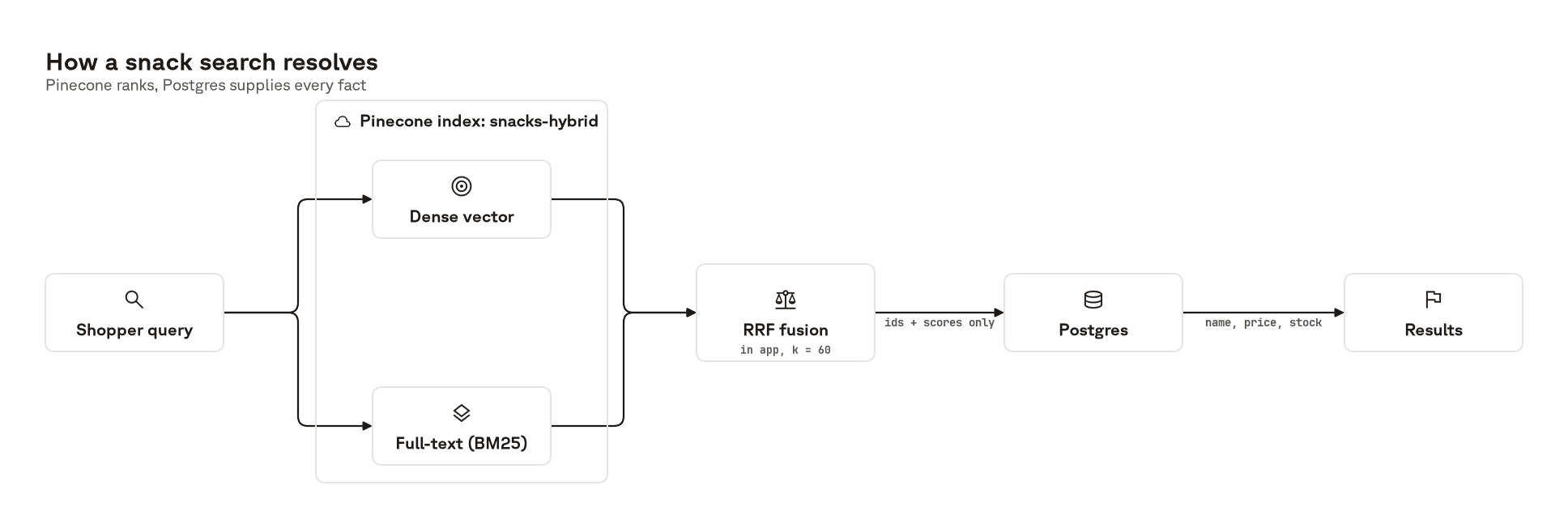
Then you can run keyword search, semantic search, or both at once and fuse the results, using reciprocal rank fusion (RRF).
We run the dense query and the full-text search query in parallel, then fuse the two rankings.
Each list contributes 1 / (k + rank), so a snack that shows up in both lists gets both contributions and beats one that only a single retriever surfaced.
To do RRF with the Documents API, you run two searches against the same index and fuse the results.
By the way, this whole demo works under our free Starter tier, but if you are curious about costs work with the documents API, take a look here.
Also, stemming and stopWords both default to false on a full-text field. For this example, we flipped it to true, so that partial words and variations could still match.
So you bring this spec back to the snack shop and they think it’s great, but they have another question:
If an item sells out, will the recommendations reflect this in Pinecone?
Why Pinecone and Postgres
We’ve figured out our solution for search. But, what do we do for inventory? Can’t we just keep using Pinecone?
This is where Postgres comes in. Postgres works alongside Pinecone as a system of record.
Specifically, as a structured data store that captures the snacks you have, the inventory, and how much you're charging people for them. These kinds of databases are great at aggregations, and other operations that rely on searching across the whole inventory.
Then in Pinecone you put the stuff you want vectorized and connect them through “id” fields that link items from Postgres to Pinecone.
Here’s a quick snipper on what this table for snacks in Postgres look like:
// The system of record: what's on the shelf, what it costs, how many are left.
export const snacks = pgTable("snacks", {
  id: text("id").primaryKey(),
  name: text("name").notNull(),
  text: text("text").notNull(),
  category: text("category").notNull(),
  priceCents: integer("price_cents").notNull(),
  stockQty: integer("stock_qty").notNull(),

  inIndex: boolean("in_index").notNull().default(true),
  createdAt: timestamp("created_at").notNull().defaultNow(),
  updatedAt: timestamp("updated_at").notNull().defaultNow(),
});
This is a common architectural pattern that developers use. But, why not just use pgvector?
Pinecone works great here alongside Postgres for a few reasons:
- Hybrid search: we get hybrid search out of the box, thanks to the Documents API, which isn’t easy with pgvector and postgres
- Specialization: search traffic stops competing with checkout, so this specialization allows us to maintain performant recsys under load without compromising how the checkout updates work. If we combined both, they’d share the same memory and compute which can cause issues during spikes
- Ease of use: Pinecone is easy to use and integrate with Postgres, and scales up and down when we need to. If we ever need to scale, it stays free!
Pinecone ranks, Postgres answers
What makes the pair work is that search asks Pinecone for ids and scores, and nothing else:
// src/lib/snacksPinecone.ts

const { matches } = await index.documents.search({
  topK,
  scoreBy,
  includeFields: [],
  ...(filter ? { filter } : {}),
});
includeFields is empty. Every fact a shopper sees, the name, the price, whether it's actually in stock, gets read out of Postgres afterward using those ids.
That split decides what can go wrong.
If Pinecone falls behind Postgres, the worst it can do is rank a sold-out snack too high, which costs you result quality. It can't quote a wrong price or sell something that isn't there, because it never held the price or the stock count to begin with.
So what actually happens when someone buys the last bag of something? That's what the simulation is for.
Simulating shoppers to search
So that's cool, but it's really hard to see and feel what Postgres and what Pinecone are doing well together just in the search view. So, I built a whole simulation of shopper agents hitting the store, to demonstrate what happens when things get bought and sold out.
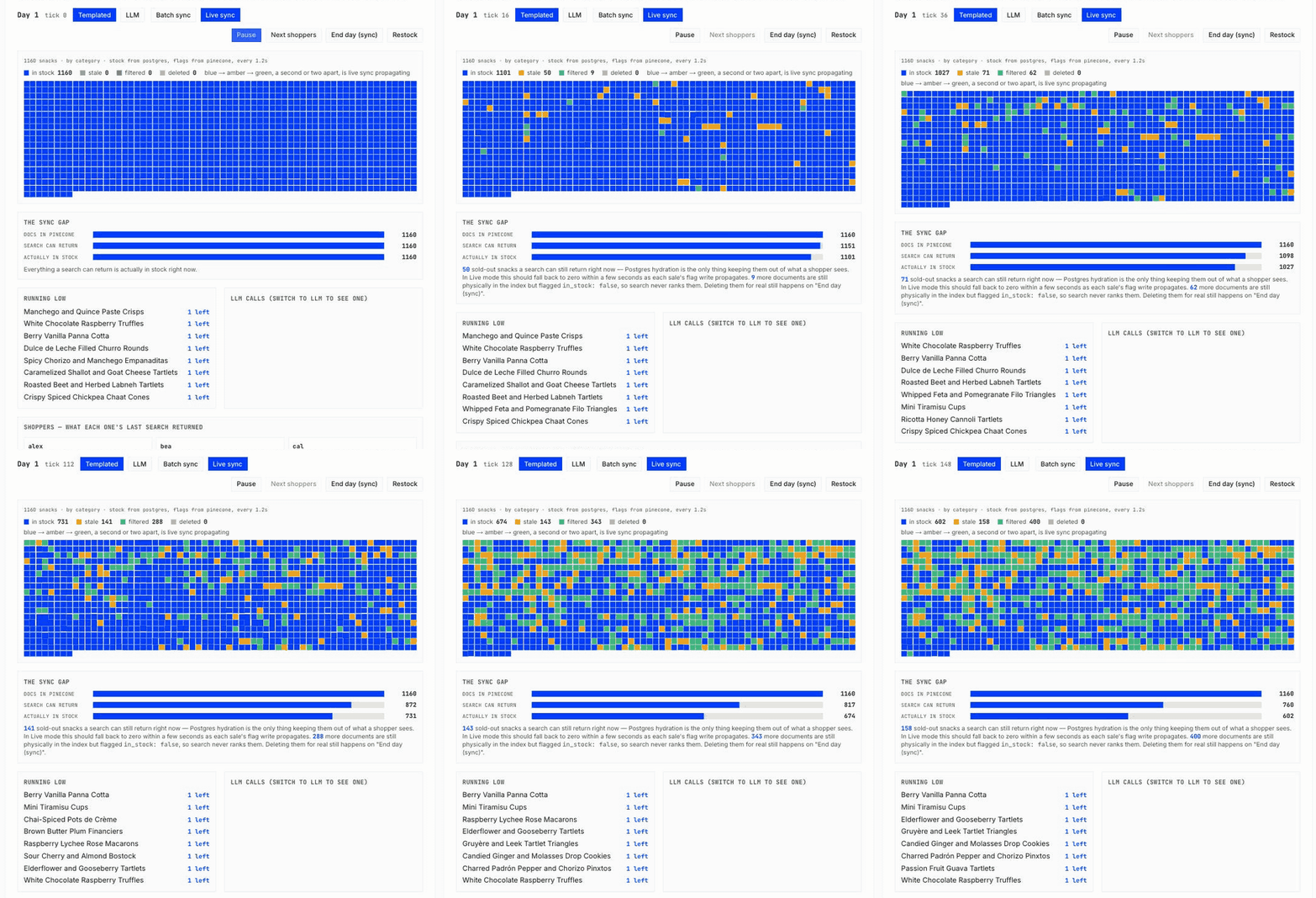
So /shop runs a shopping day. Shoppers arrive, search, and try to fill a cart of three to five items from whatever comes back. For the purposes of our demo, there's only one of everything. This makes it easy to show when things go out of stock.
To make the demo easier to run, we've added a mode that just cycles through a couple combinations of pre-selected shoppers. These are the "templated shoppers", and are great for just playing with the demo without an API key.
The LLM shopper mode has Gemini (gemini-3.8-flash) come up with queries in character, so you get real, messy, varied queries hitting the index. This is neat as we can showcase real load against the setup, and see how both databases work together.
Every purchase decrements stock in Postgres, and the sale is a single atomic statement:
// src/db/queries.ts

.update(snacks)

.set({ stockQty: sql`${snacks.stockQty} - 1`, updatedAt: new Date() })

.where(and(eq(snacks.id, id), sql`${snacks.stockQty} > 0`))
That WHERE clause only matches a row that still has stock. So when two shoppers race for the last bag, one of them gets nothing back and we record a sold_out outcome instead of selling the same snack twice.
Blue squares turn amber the moment a snack sells out, then green once Pinecone's in_stock flag lands. That amber gap is the propagation delay.
If there wasn't any sort of sync, then we'd be serving recommendations that are not actually possible to buy. This isn't necessarily bad for some vendors, but for our purposes we'd like to avoid it.
Picture the version where there's no sync at all. Somebody buys a snack, it goes out of stock, and we keep serving it as a recommendation to everyone else. They click through and can't buy it.
How the syncing works
Now, how do Pinecone and Postgres stay in sync?
Two different jobs fall under "sync" here, and it helps to keep them apart:
- Syncing copies the catalog from Postgres into Pinecone. It's how the index gets built and rebuilt.
- Updating tells Pinecone about a single sale while the shop is running.
Both run in one direction only. Postgres is the source of truth, and Pinecone is derived from it.
Syncing: rebuild from Postgres
Postgres holds the facts (name, description, price, stock) and Pinecone holds the vectors. Everything Pinecone needs can be rebuilt from the `snacks` table by embedding it on the way in, so you can blow the index away and rebuild it whenever you want.
Rebuilding the entire index is a `SELECT`, an embed call, and an upsert, in a loop:
// src/db/seed.ts
const page = await db
  .select({
    _id: snacks.id,
    name: snacks.name,
    text: snacks.text,
    category: snacks.category,
  })
  .from(snacks)
  .orderBy(asc(snacks.id))
  .limit(UPSERT_BATCH)
  .offset(offset);

await upsertToIndex(await embedSnackDocuments(page));
It pages through 96 rows at a time, makes one embedding call per page, and reads no files. It doesn't even need to know what's currently in the index, because upserting a document Pinecone already has is allowed and simply overwrites.
The same loop handles a corrupted index, a schema change that forces you to delete and recreate, or spinning up a second environment from the same catalog.
The demo has two buttons that run a sync:
- Restock rebuilds the whole index from Postgres. It's the quickest way to reset the demo.
- End day stops shopping, deletes sold-out snacks from Pinecone, and re-adds restocked ones, so the next day won't surface them at all.
Here are all four operations that push data into Pinecone:
| Operation | When it runs | What it does | Snacks Embedded |
|---|---|---|---|
| Cold start | npm run setup | Embeds the catalog, fills Postgres, upserts everything | 1,160 |
| Restock | Button in /shop | Rebuilds every document from the snacks table | 1,160 |
| End day sync | End of a simulated day | Deletes sold-out docs, re-adds restocked ones | Restocked only |
| Live flag | On a sellout, live mode | Patches in_stock on one document | 0 |
Updating with Batch mode and live mode
The simulation ships two strategies for syncing, and you can flip between them while it's running.

Batch mode is the simple one. Pinecone carries no stock information at all. A sold-out snack keeps ranking until end day sync deletes it, and the Postgres lookup is the only thing keeping it out of the results anybody sees. Zero writes per sale.
Live mode patches the document the moment a shelf empties:
// src/lib/snacksPinecone.ts

await index.documents.update({ documents: [{ _id: id, in_stock: inStock }] });
and the search carries a filter of { in_stock: { $eq: true } }.
That one line is cheap because documents.update is a partial-field patch, not a replacement. The name, the text, the category and the embedding all survive an update carrying only _id and in_stock.
We have a contract test that asserts the embedding comes back byte-identical afterward, because if that ever stopped being true the live path would start destroying documents without telling you. documents.upsert is the opposite: a full replace that needs every field present.
Try it yourself
Setting up sync between Postgres and Pinecone is easy once Postgres owns the facts and Pinecone only hands back ids, and you get the benefits of both systems without having to reconcile them.
Try the demo yourself. You’ll need a Pinecone API key, an optional Gemini API Key, and some way of making the Postgres table. We used Supabase, so having an account there will help too. Follow the walkthrough at the repo here.
By the way, this example works with any Postgres provider. We use Drizzle under the hood to talk to Supabase, but you could do this with Neon or anything else that hands you a connection string.
Syncing between a Postgres provider like Supabase or Neon doesn’t have to be hard with Pinecone. Next time you look to build hybrid search, just use Pinecone… and Postgres!
Was this article helpful?