Integrated embedding on the Documents API


Today, integrated embedding comes to the Pinecone Documents API, bringing embedding and search together in one API. One text field now serves both semantic search and full-text search. Teams don't have to vet an embedding provider or build and maintain a pipeline that calls one, and embedding and search are billed together on one Pinecone invoice.
Three embedding models are available at launch. llama-text-embed-v2 is the default for semantic search and handles long passages in 26 languages. multilingual-e5-large is an alternative for multilingual text. pinecone-sparse-english-v0 adds keyword-style matching that learns which words matter most in each passage.
What's new for platform and application teams
Until now, each application team that wanted semantic search brought its own embedding provider. The platform team had to vet that provider, then support the pipeline that called it on both the write path and the query path, with its own keys, rate limits, retries, and monitoring. Every new application could add another provider and another pipeline.
Integrated embedding runs the models inside Pinecone, a vendor the platform team already supports. One API now takes raw text and serves both lexical and semantic search. Your application picks the method for each request. Both methods use the same API and the same field. Documents and queries are embedded with the same model, so a query is never compared against vectors made by a different one. When a document changes, Pinecone embeds the new text in the same write. Semantic search and full-text search both reflect the change, with no re-embedding job to schedule or monitor.
How it works
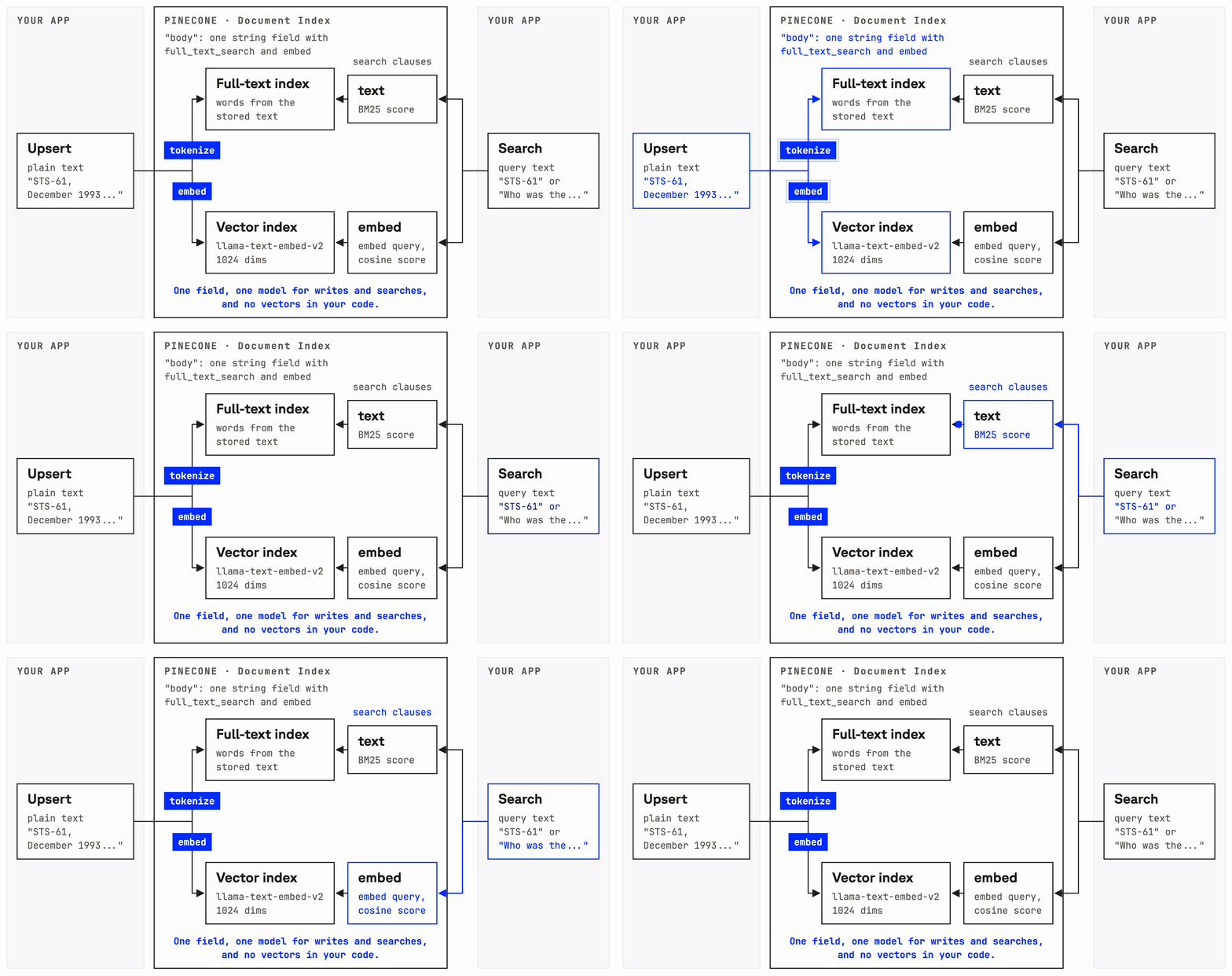
You add an embedding model to a text field in the index schema, next to that field's full-text search setting, and Pinecone uses it for every document and every query on the field. You can also choose any dimension the model supports. To add sparse retrieval on the same field, add a sparse_embed setting with pinecone-sparse-english-v0. The index description shows the model, dimension, and metric each field uses.
from pinecone import Pinecone

pc = Pinecone(api_key="YOUR_API_KEY")

pc.indexes.create(
    name="help-center",
    schema={
        "fields": {
            "text": {
                "type": "string",
                "full_text_search": {"language": "en", "stemming": True, "stop_words": True},
                "embed": {"model": "llama-text-embed-v2"},
                "sparse_embed": {"model": "pinecone-sparse-english-v0"},
            }
        }
    },
)
When you upsert a document as plain text, Pinecone embeds it as it arrives. An update that changes the text re-embeds it and replaces the document's old vectors. An update to other fields leaves the vectors alone and uses no embedding tokens. If embedding fails, nothing in the request is written.
index = pc.index("help-center")

index.documents.upsert(
    namespace="articles",
    documents=[
        {"_id": "kb-101", "text": "To reset your password, open Settings and choose Security..."},
        {"_id": "kb-205", "text": "Error ERR-4031 means your API key has expired..."},
    ],
)

index.documents.update(
    namespace="articles",
    documents=[{"_id": "kb-205", "text": "Error ERR-4031 means your API key has expired or was revoked..."}],
)
A search sends its query as plain text with one of three scoring methods: embed ranks documents by meaning, sparse_embed ranks them by the sparse model's learned keyword weights, and text ranks them by BM25 keyword match. All three scoring methods work on the same field. In one request, a full-text filter such as $match_phrase limits the search to documents that contain an exact phrase, such as an error code, and the semantic query ranks those documents by meaning. The search guide covers the options. These calls work in the Pinecone API, version 2026-07, and in Python SDK 10.1.0, TypeScript SDK 9.1.0, and Go SDK 7.1.0 or later.
semantic = index.documents.search(
    namespace="articles",
    top_k=5,
    score_by=[{"type": "embed", "field": "text", "query": "I can't sign in to my account"}],
    include_fields=["text"],
)

# Only articles that mention the exact error code, ranked by meaning
combined = index.documents.search(
    namespace="articles",
    top_k=5,
    score_by=[{"type": "embed", "field": "text", "query": "how do I fix this error"}],
    filter={"text": {"$match_phrase": "ERR-4031"}},
    include_fields=["text"],
)
To see how integrated embedding works inside Pinecone, read When vectors became an implementation detail.
Choosing a model
Most teams can start semantic search with the default model, llama-text-embed-v2. It takes long passages and works in 26 languages, including Spanish, Chinese, and Japanese. multilingual-e5-large is an open-source model from Microsoft Research that suits shorter multilingual inputs of up to 507 tokens. pinecone-sparse-english-v0 adds sparse retrieval for English text only.
| Model | Max input tokens | Dimensions |
|---|---|---|
| llama-text-embed-v2 | 2,048 | 384, 512, 768, 1024 (default), or 2048 |
| multilingual-e5-large | 507 | 1024 |
| pinecone-sparse-english-v0 | 512 (default), up to 2,048 | Sparse, no fixed dimension |
Prices for all three models are on the pricing page.
Storing text and moving data
If you'd rather not store raw text, set "store_text": False on a field that only needs semantic search. Pinecone embeds the text, discards it, and keeps only the vectors. That field can't use full-text search or $match_* filters, and naming it in include_fields returns an error. Results return each document's ID, score, and any other stored fields.
To bring existing data over, create a Documents API index with an embedding model on the text field and upsert the text. Pinecone embeds each document with that model as it loads, so every vector in the index comes from the same model that will embed the queries. The backfill bills per token at the rates on the pricing page.
If you use the Records API today, a Documents API index keeps the same text-in, text-out pattern and adds full-text search. Pinecone is working on support for moving Records API indexes to the Documents API.
Fewer calls, faster search
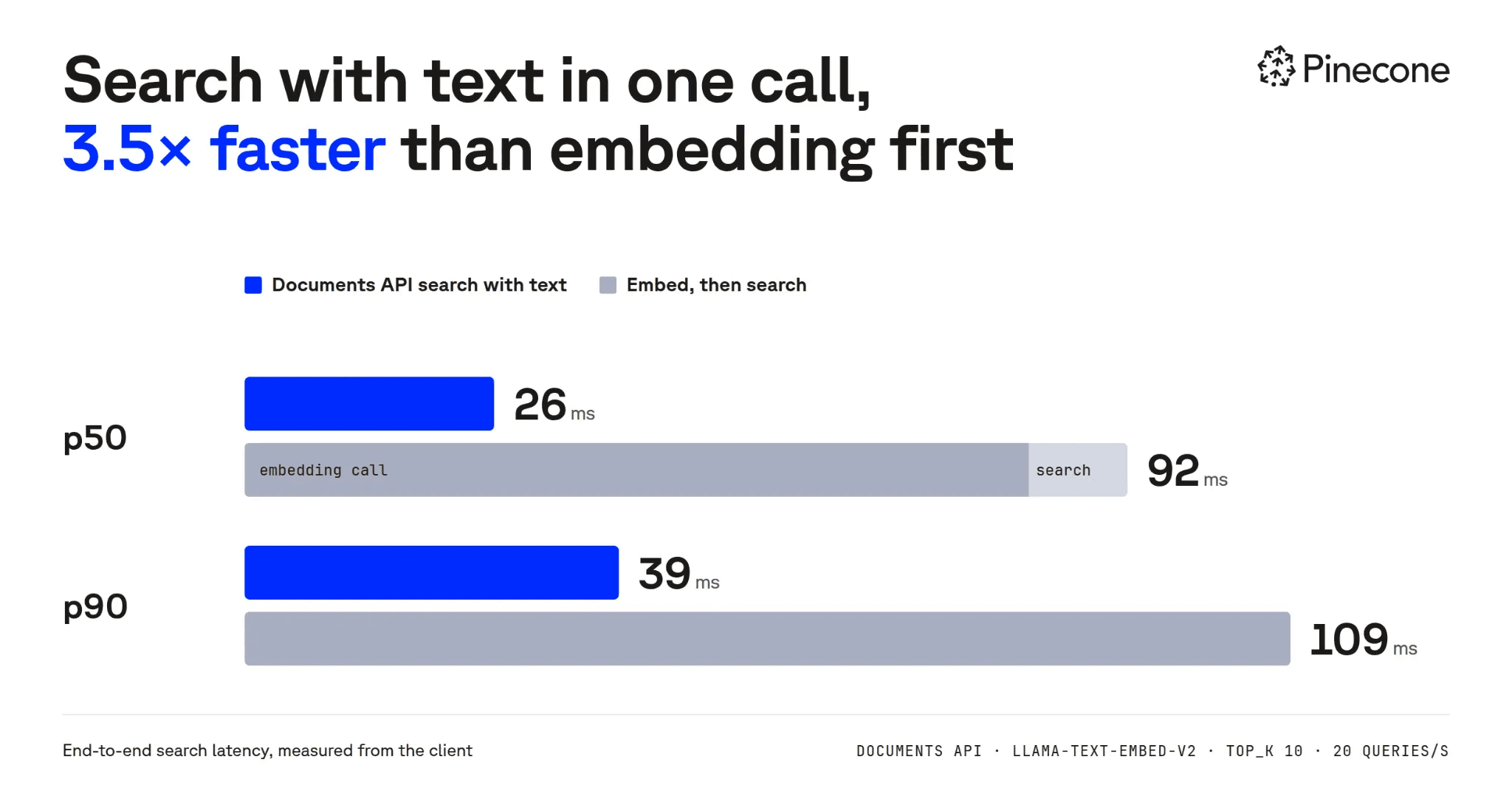
Pinecone embeds the text and runs the search in a single request, simplifying your application and reducing latency. In a Pinecone test from a client in US East, using llama-text-embed-v2 at 20 queries per second, the combined request had a median latency of 26 ms. Calling the standalone embedding API first and then searching with the resulting vector took 92 ms.
What's coming next
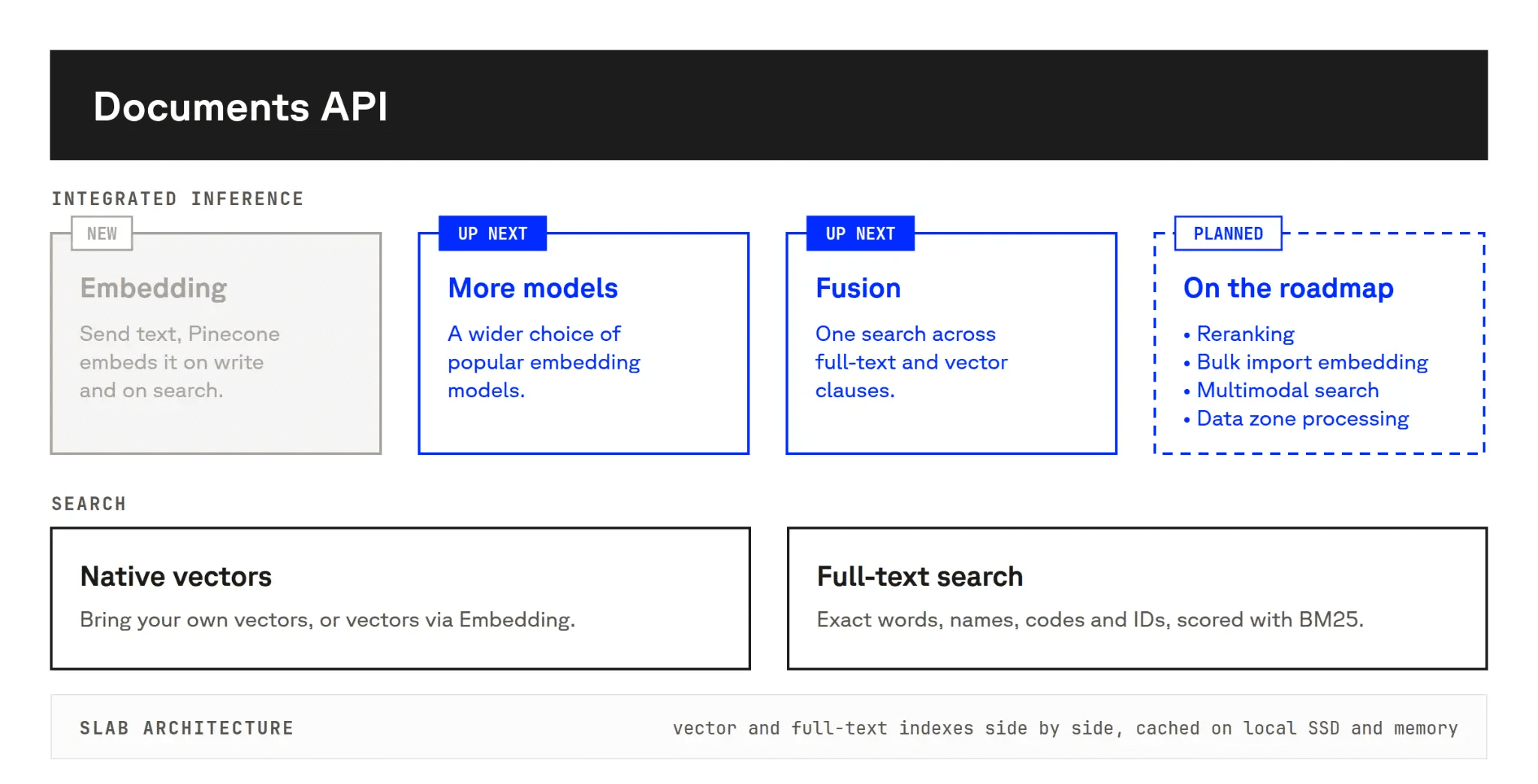
Next up are OpenAI's text-embedding-3-small and text-embedding-3-large, plus Google's gemini-embedding-2. Teams that embed with OpenAI or Google today will be able to keep their model and drop their embedding pipeline, with no provider account or API key to manage. Server-side fusion is coming too. It will merge full-text and semantic results into one ranked list inside Pinecone, replacing the merge code applications write today. After that, Pinecone plans to add integrated reranking, embedding during bulk import, and data zone processing, which keeps embedding requests inside a geography the customer picks.
Get started
Integrated embedding on the Documents API is available today on serverless indexes. The integrated embedding guide walks through creating an index, writing documents, and running your first search.
Was this article helpful?