Managed AI infrastructure with a zero-access operating model
Don’t let security reviews block your path to production. Run Pinecone inside your AWS, GCP, or Azure account. Keep the managed service experience, without giving Pinecone SSH, VPN, or inbound network access to your environment.
Key Benefits
Zero-access operations
Pass security reviews faster: No SSH, VPN, or inbound firewall ports means fewer objections from your security team.
Data sovereignty
Meet data residency requirements: Vectors and queries never leave your VPC.
Governance & auditability
Satisfy compliance audits: Every cluster operation is logged as a Kubernetes custom resource.
Network isolation
Reduce your attack surface: Use public endpoints or go private-only with AWS PrivateLink, GCP Private Service Connect, or Azure Private Link.
Zero-access security model
Zero-access means
Pinecone does not need interactive access to your infrastructure to operate BYOC
- No SSH, VPN, or inbound access to your VPC or cluster.
- Your cluster pulls queued operations from the control plane over TLS and executes them locally.
- Only operational metrics and traces are sent for monitoring, never vectors or request payloads.
Zero-access does not mean
You don't lose the managed Pinecone workflow and support.
- You don't lose the Pinecone workflow you're used to. You still use the API and console for index lifecycle, auth, and usage visibility.
- You don't lose support. We can support you without accessing your cloud account or cluster.
How it works
Split-plane architecture, applied to your security boundary
BYOC keeps the data plane inside your cloud account while preserving the managed Pinecone control plane experience your teams already use.
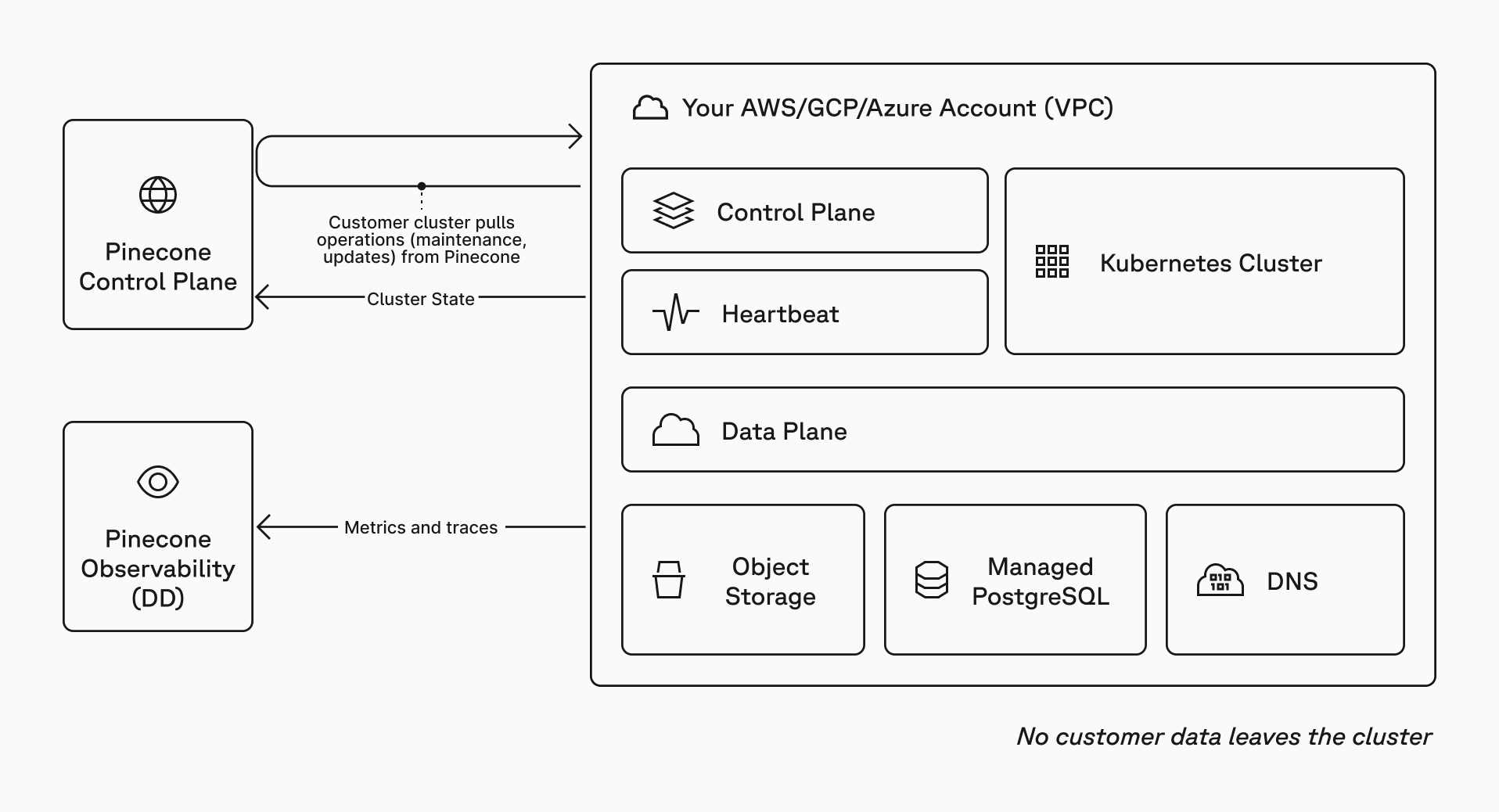
Deploy and connect
Self-serve deployment
Run the setup wizard, deploy with Pulumi, then create and manage indexes through the standard Pinecone API and console.
# Run the setup wizard
curl -fsSL https://raw.githubusercontent.com/pinecone-io/pulumi-pinecone-byoc/main/bootstrap.sh | bash

# Deploy into your cloud account
cd pinecone-byoc
pulumi up
FAQs
No. BYOC is zero-access: Pinecone does not need SSH, VPN, or inbound network access to your VPC, cluster, nodes, or workloads.
Operational metrics and traces can leave for monitoring. Vectors, record metadata, and request payloads do not.
The control plane (managed by Pinecone) is used for index lifecycle, authentication, user management, billing, and usage visibility.
The data plane (hosted by you) handles vector storage and query execution inside your VPC.
The control plane queues operations, and components in your cluster pull and execute them over TLS, then report status back.
Your apps connect directly to the BYOC index endpoint in your VPC. You can use public endpoints or private-only connectivity via AWS PrivateLink orGCP Private Service Connect, or Azure Private Link.
BYOC supports AWS, GCP, and Azure for Enterprise users in public preview, including DRN indexes (single-namespace) and the split control plane/data plane architecture.
Capabilities that depend on Pinecone-hosted services outside your account (for example, Assistant, Inference, On-Demand indexes, and DRN integrated embedding) are not available in BYOC today.
You pay your cloud provider for infrastructure, and you pay Pinecone a separate usage fee based on the size of your provisioned deployment. Contact us for assistance sizing and pricing your BYOC deployment.
Start building knowledgeable AI today
Run Pinecone inside your AWS, GCP, or Azure account with a zero-access operating model using the same managed Pinecone workflow you’re used to.