How Pinecone Works
Pinecone is a vector database built from the ground up for AI workloads at scale. This page is the definitive technical reference for how Pinecone stores, indexes, and retrieves vectors, covering the serverless object-storage architecture, write and read paths, compaction, metadata filtering, and distributed query execution.For a more detailed deep dive, read the whitepaper.
Architecture Overview
Pinecone is a fully managed, object-storage based vector database. Traditional vector databases require you to provision and manage fixed server clusters. Pinecone takes a different approach: data is stored separately from the machines that process queries. Your vectors live in cloud storage (e.g., Amazon S3), while a flexible pool of processors handles searches. Because these are separate, storage can grow without requiring more processing power, and vice versa. You never need to guess capacity or manage servers.
Fast writes without sacrificing reads
Data is acknowledged in under 100ms and appears in search results within seconds, regardless of index size.
Vectors stored at original quality
Vectors are stored exactly as they are sent, with no data loss. Other systems often compress vectors before storage to save space, permanently reducing accuracy.
Metadata filtering accelerates queries
Selective filters reduce the data scanned, making filtered queries faster than unfiltered ones.
Automatic scaling
Data distributes across immutable files processed in parallel. No parameter tuning, no algorithm selection, no cluster management.
Storage Architecture: The LSM-Based Slab System
Pinecone uses a Log-Structured Merge (LSM) tree approach to organize data. LSM trees are a proven storage pattern designed for write-heavy workloads. The core principle: writes are always sequential. Data is appended to new files rather than modifying existing ones. This makes writes extremely fast and allows reads to happen simultaneously without conflicts.
In Pinecone, the fundamental unit of storage is called a slab.
What is a slab?
A slab is an immutable, self-contained set of files that holds everything needed to process search queries over the records it contains. It's composed of:
- Raw vectors and metadata stored separately for efficient access
- Vector search indexes with algorithms chosen dynamically based on slab size
- Compressed versions automatically created to reduce size while preserving accuracy
- Sparse vector indexes if records contain sparse vectors
- Metadata bitmap indexes for fast filtered queries
- Manifest file describing contents and structure
The Write Path: How Data Gets Into Pinecone
Pinecone processes writes in multiple phases, each optimized for a different goal: acknowledgment speed, indexing throughput, and query optimization.
All writes are persisted on object storage. To put throughput in perspective: saturating the 64MB/s S3 bandwidth limit requires 32 write operations per second with 300–500 vectors each — over 10,000 vectors per second. Most applications send smaller batches during steady-state streaming writes, and write latency remains consistently low. Pinecone uses a linear scan (which is perfectly accurate for up to 10,000 vectors) to serve queries on data that haven't yet been written to a slab. The index never needs to rebuild or reprocess the entire dataset to incorporate new data.
Write Acknowledgment
When you send a write request (upsert, update, or delete), Pinecone acknowledges it as soon as the operation reaches durable storage. The system writes the operation to a Write-Ahead Log (WAL) on S3 and immediately returns confirmation to your application. Write latency is under 100ms. Each write operation can contain up to 2MB of data in a single batch.
Index Building
After the write reaches S3, the index builder processes it asynchronously per namespace using a consistent hash ring. The index builder pulls up to 10,000 records at a time from the WAL and loads them into a memtable — an in-memory data structure. Records in the memtable are available for querying immediately, even before they flush to disk.
Freshness Guarantees
Updates appear in search results within seconds. The memtable provides immediate access to new data. Asynchronous processes handle persistence and optimization without affecting query latency or write throughput. There is no "eventual consistency" window of minutes or hours — seconds is the norm.
Compaction: How Pinecone Asynchronously Optimizes Data
Each memtable flush creates an L0 slab. L0 slabs are small and fast to create — they contain up to 10,000 records. As L0 slabs accumulate, the compaction process merges them into larger, more optimized structures. Here's how the compaction process works:
How the compaction process works
First write
Your first vector write goes to the WAL. The index builder picks it up, loads it into the memtable, and flushes it to disk as an L0 slab.
L0 slabs accumulate
As more records arrive, they also flush to disk as L0 slabs.
L0 → L1 compaction
When approximately 10 L0 slabs accumulate, compaction gathers the vectors from those slabs and creates a single L1 slab. The new L1 slab is written to object storage and prewarmed to query executors to eliminate any potential for cold starts. The source L0 slabs are marked for deletion.
Partial compaction
If 12 L0 slabs existed when compaction started, 2 L0 slabs and 1 L1 slab remain after compaction. All queries now use those 3 slabs.
L1 → L2 compaction
This repeats with the goal of keeping the total slab count under approximately 20. When more than 10 L1 slabs exist, compaction merges them into L2 slabs.
Steady state
At steady state you might have 2 L0 slabs, 5 L1 slabs, and 3 L2 slabs. Queries use all 9 slabs.
Asynchronous operation
While compaction runs, new writes continue creating L0 slabs. Asynchronous compaction runs continuously.
These are the types of slabs that exist:
L0 Slabs
Up to 10,000 records. Created every memtable flush.
L1 Slabs
Up to ~100,000 records. Created when ~10 L0 slabs accumulate.
L2 Slabs
Up to ~1,000,000 records. Created when ~10 L1 slabs accumulate.
L3 Slabs
Over 1,000,000 records. Dedicated Read Nodes only.
For on-demand, Pinecone limits the structure to L2 and caps slabs at roughly 10GB. This ensures many reasonably sized files that distribute well across the resource pool. For Dedicated Read Nodes, an additional L3 level is used because each node is dedicated to a single index and can handle larger files. The slab level depends on dataset size, not compaction frequency. As the dataset grows, data flows from many small slabs at higher levels to fewer, larger slabs at lower levels.
Dynamic Algorithm Choices Per-Slab
Because data is automatically partitioned into multiple slabs with different sizes, Pinecone selects the optimal indexing algorithm for each slab independently. You never choose or tune an algorithm — the system selects the best one for each slab based on its characteristics. Further, since slabs are immutable, indexing algorithms never drift; newly-written vectors get a slab of their own, while existing slabs maintain consistent, optimal accuracy.
The algorithm choice depends on slab size, not slab level. L0 slabs are always Ananas; L1 and L2 slabs use PQFS if small, but switch to IVF when larger. Since Pinecone actively researches and develops new algorithms, the database's compaction-based architecture enables transparent algorithmic upgrades without requiring any changes on your part.
Memtable
Linear scan — Up to 10K newly-written vectors reside in RAM as part of the memtable. Perfectly accurate KNN search.
Small slabs (up to 10k)
Ananas — Pinecone's proprietary implementation based on the Fast Johnson-Lindenstrauss Transform (FJLT). Tuned for fast creation and very fast reads.
Medium slabs (up to 100k)
PQFS — Pinecone's proprietary product quantization algorithm based on Asymmetric Distance Computation (ADC).
Large slabs (over 1M)
IVF — Inverted File (IVF) indexing clusters vectors and scans only relevant clusters per query. Each cluster is itself a small PQFS index.
The Read Path: Distributed Search on Pre-Warmed Data
Because every slab is processed independently and in parallel, query latency stays low from millions to billions of vectors.
To ensure consistent latency, all slabs stay warm in a persistent, disk-based cache on query executors, thereby eliminating any potential for cold starts. Slabs are also stored in object storage for persistence and coordinating compaction.
How a query is processed
The query hits the API gateway, which routes it to the query router.
The query router fans the query out to multiple query executors using a scatter-gather pattern.
Each query executor is responsible for one or more slabs. It processes its assigned slabs locally and in parallel, using the algorithm specified in each slab's manifest.
Each executor returns its local top-k results to the query router.
The query router merges all partial results and returns the global top-k to the client.
System Components: High-Level Data Flow
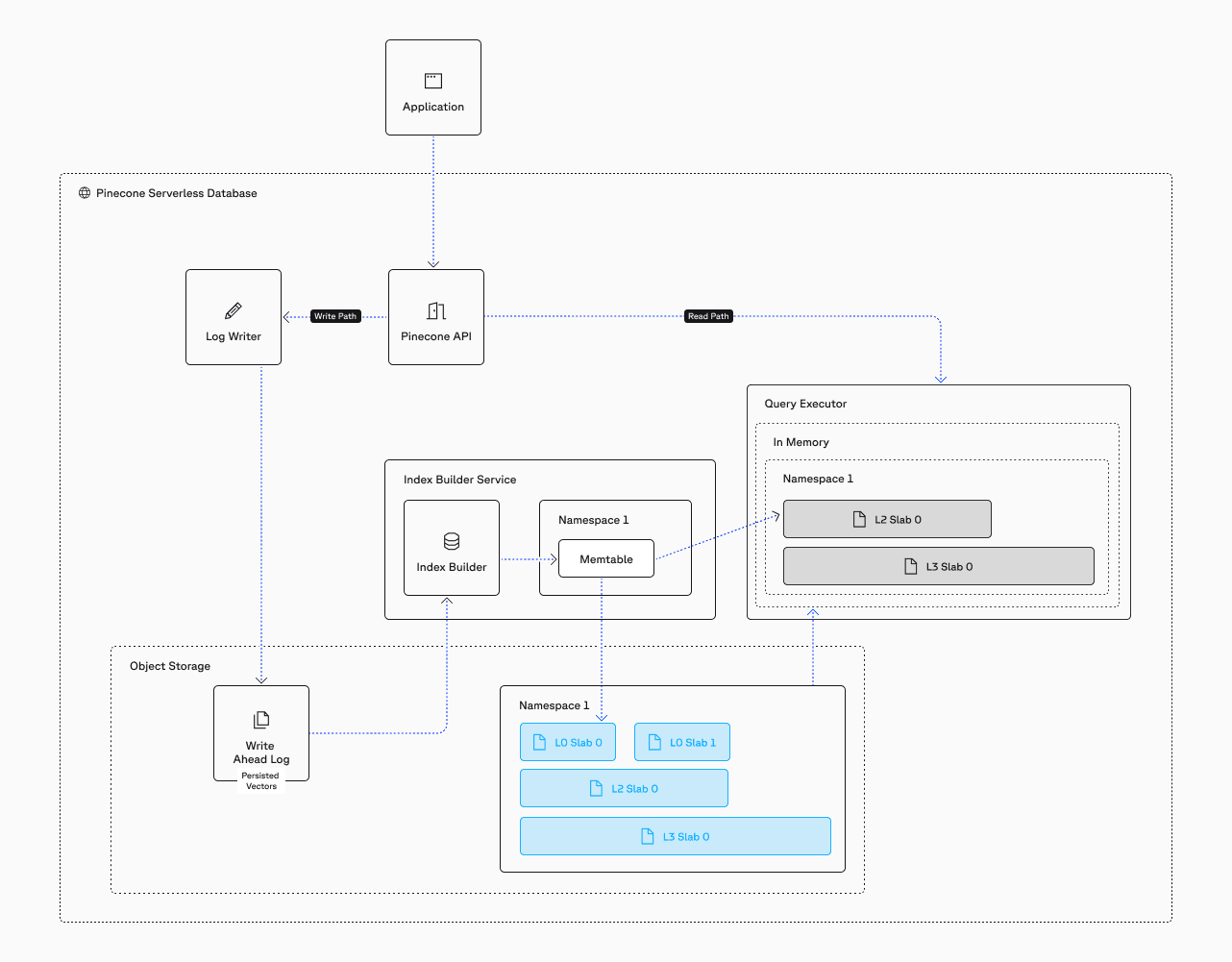
At a high level, Pinecone's serverless architecture consists of the following components:
Write path
- API Gateway: Receives client requests and routes them to the appropriate path (read or write).
- Index Builder: Processes writes asynchronously. Operates per-namespace using a consistent hash ring to distribute work.
- Write-Ahead Log (WAL): Durable log on object storage (S3). Ensures writes are persisted before acknowledgment.
- Memtable: In-memory structure holding the most recent writes. Queryable immediately. Flushes to L0 slabs.
Read path
- Query Router: Receives queries from the API gateway. Fans them out to query executors and the memtable. Merges partial results into the final top-k.
- Query Executors: Stateless compute nodes that cache slabs on local SSDs. Each executor processes one or more slabs for a given query. The pool of executors scales dynamically.
- Object Storage (S3): The durable backing store for all slabs. Query executors pull slabs from object storage and cache them locally.
Scaling Throughput: Deployment Models
Pinecone offers two deployment models that share the same underlying architecture but optimize for different traffic patterns.
On-Demand
On-Demand indexes use shared infrastructure. Resources scale elastically based on usage, and you pay per read unit consumed. The system handles variable traffic automatically. Ideal for workloads with inconsistent or bursty query patterns — traffic can spike and drop without manual intervention, and you don't pay for idle capacity. Slabs are limited to L2 and capped at roughly 10GB to ensure many reasonably sized files that distribute well across the shared resource pool.
Dedicated Read Nodes (DRN)
DRN indexes run on reserved infrastructure. You provision specific capacity for your index, and pricing is based on the number of shards and replicas you deploy — not query volume. This means you pay the same cost whether you run 100 or 100,000 queries per hour. There is no read unit rate limiting. DRN uses an additional L3 slab level because each node is dedicated to a single index and can handle larger files. Throughput scales independently by adding replicas via API or the Pinecone Console.
Conclusion
Pinecone's serverless, object-storage-based architecture eliminates the tradeoffs that have historically plagued vector search. The LSM-based slab system enables fast writes without sacrificing query performance. Adaptive metadata filtering makes searches faster when filters are selective. Full-fidelity storage preserves accuracy without forcing manual quantization. And asynchronous compaction provides continuous, transparent optimization — including algorithmic upgrades — without downtime or re-ingestion.
The result: writes acknowledge in under 100ms, data appears in queries within seconds, and latency stays low from millions to billions of vectors. You don't tune parameters, manage infrastructure, or reduce data fidelity. You build your application, and Pinecone handles the rest.
Download the whitepaper for a deep dive of the architecture.
Frequently Asked Questions
Pinecone uses a serverless architecture built on object storage (such as Amazon S3) with a Log-Structured Merge (LSM) tree-based storage system. Data is stored in immutable files called slabs, and queries are processed by a fleet of stateless query executors that cache slabs on local SSDs. Storage and compute scale independently, eliminating the need to provision or manage fixed infrastructure.
Pinecone stores vectors at full fidelity (full 32-bit precision, any dimension) in immutable files called slabs on object storage. Each slab contains the raw vectors, an ANN index (with the algorithm chosen dynamically based on slab size), bitmap indexes for every metadata field, and a manifest describing the contents. Pinecone applies optimized quantization internally during asynchronous compaction — users never need to reduce precision before ingestion.
Pods are Pinecone's legacy architecture. The current Pinecone architecture is serverless, built on object storage with decoupled storage and compute. Pod-based indexes are still supported for existing users, but all new indexes should use the serverless architecture, which offers better scalability, lower operational overhead, and automatic optimization. Pinecone provides migration paths from pods to serverless.
Pinecone acknowledges writes in under 100ms. The system writes operations to a durable Write-Ahead Log (WAL) on S3 and returns confirmation immediately, without waiting for indexing to complete. Data appears in search results within seconds via an in-memory memtable. Each write can contain up to 2MB of data (hundreds of vectors depending on dimensions).
Pinecone indexes every metadata field using roaring bitmaps. At query time, Pinecone dynamically chooses between pre-filtering (scanning only matching records) for selective filters and mid-scan filtering for broad filters. Pinecone never uses traditional post-filtering, which can return fewer than the requested number of results. Selective filters make queries faster, not slower.
No. Pinecone automatically selects the optimal ANN algorithm for each slab based on its size and data characteristics. Small slabs use Pinecone's proprietary Ananas algorithm (based on FJLT), medium slabs use Pinecone's proprietary PQFS algorithm (Product Quantization Fast Scan), and large slabs use IVF indexing. Quantization parameters are also tuned automatically during asynchronous compaction. Users do not configure algorithms, cluster topology, or indexing parameters.
On-Demand indexes use shared infrastructure with elastic scaling and per-read-unit pricing — ideal for bursty or variable workloads. Dedicated Read Nodes (DRN) run on reserved infrastructure with flat-fee pricing based on shards and replicas — ideal for sustained high-throughput workloads with no rate limiting. Both share the same underlying storage architecture.
Pinecone partitions each namespace into dozens to hundreds of immutable slabs stored on object storage. At query time, slabs are distributed across a fleet of query executors and processed in parallel using scatter-gather. Because each executor handles only its assigned slabs, the query latency stays low from millions to billions of vectors. The executor pool scales dynamically.
Compaction is an asynchronous process that merges smaller slabs into larger, more optimized ones. Small L0 slabs (up to 10K records each) are merged into L1 slabs (~100K records), which are merged into L2 slabs (~1M records). During compaction, Pinecone applies advanced quantization, selects optimal indexing algorithms, and drops deleted records. Compaction runs continuously as an asynchronous process that does not impact query performance.
No. Pinecone never requires re-indexing. New data is written to new slabs without touching existing ones. Asynchronous compaction continuously optimizes the data structures. Even when Pinecone upgrades its indexing algorithms, the improvement is applied transparently during compaction without downtime, re-ingestion, or user intervention.
Pinecone does not use Hierarchical Navigable Small World (HNSW). Instead, it dynamically selects indexing algorithms based on slab size:
- Small slabs(up to ~10K records) use Ananas, Pinecone's proprietary algorithm based on the Fast Johnson-Lindenstrauss Transform (FJLT).
- Medium slabs(up to ~100K records) use Product Quantization Fast Scan (PQFS), Pinecone's proprietary product quantization algorithm based on Asymmetric Distance Computation (ADC)
- Large slabs (over ~1M records) use Inverted File (IVF) indexing, wherein vectors are clustered and only relevant clusters are scanned per query. Each cluster is itself a small PQFS index.
Algorithm selection is automatic. You never tune it, select it, or re-ingest data when Pinecone upgrades it in the background.
Start building knowledgeable AI today
The definitive vector database for AI workloads at scale. Read the full technical whitepaper or start building today.