Use the Pinecone Plugin for Claude Code to develop AI Applications Faster

Building apps with Pinecone and Claude Code just got way easier. We've launched the official Pinecone Plugin for Claude Code—now available in the Anthropic Claude Code Plugin Marketplace.
This plugin brings Pinecone's vector database and managed RAG service directly into your development workflow, alongside preset skills, slash commands, MCP, and other handy shortcuts to get started building with Claude Code, faster.
Search and manage indexes, query Assistants, and build intelligent applications—all without leaving Claude Code.
Why Use the Pinecone Plugin?
- Natural language commands: Just tell Claude what you want, like "search my index for machine learning docs" or "create an assistant from my research-docs folder"
- Explicit commands: Need precision? Use commands like
/pinecone:queryor/pinecone:assistant-chatfor explicit access to integrated tooling - Complete vector database toolkit: Create indexes, upsert vectors, search with metadata filters, get statistics—everything you need to manage your vector data.
- Generate code for Pinecone: use
/pinecone:quickstartto learn how to build with Pinecone, and setup your development environment - Managed RAG with Pinecone Assistant: Upload documents, sync changes, and get cited answers with page numbers. No custom chunking or embedding pipeline required.
Getting Started in 60 Seconds
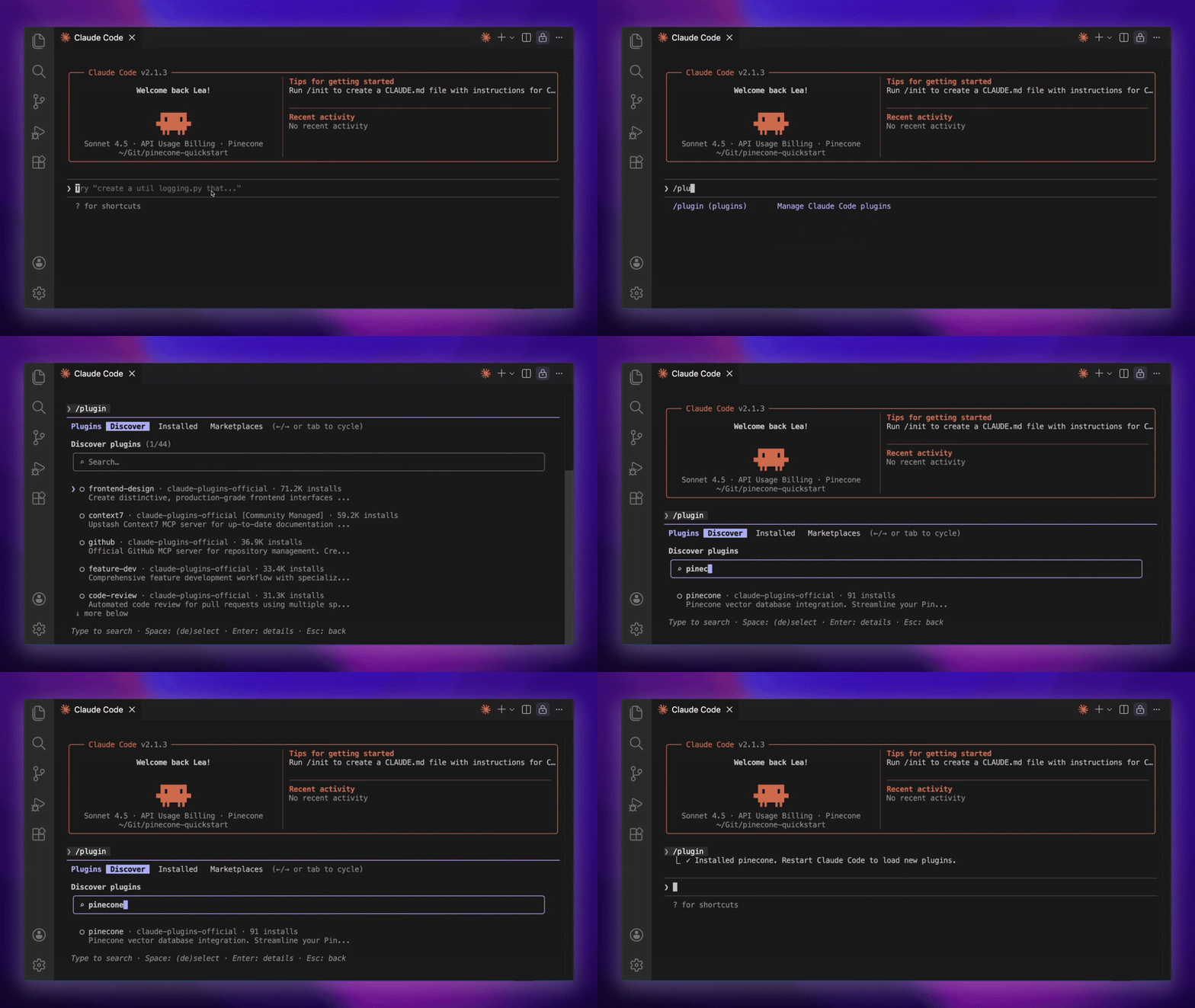
1. Set your API key
Add your Pinecone API key as an environment variable:
export PINECONE_API_KEY=your-api-key-here2. Install the plugin in Claude Code
claude plugin install pinecone3. Start building
Restart Claude Code, then ask Claude to use Pinecone:
- Claude, list my Pinecone indexes
- Build a Pinecone Assistant from the pdfs in my local folder, and then suggest some great queries to retrieve them
Or use a slash command for semantic search:
/pinecone:query query "your query here" index your-index-name
That's it. You're ready to build!
Work with Pinecone Vector Database and Pinecone Assistant all through Claude Code
Vector Search and Index Management
Work with your vector data using natural language or explicit commands:
- Search your indexes: Run semantic searches with
/pinecone:queryor just ask Claude to "search my index for X" - Manage indexes: List, create, and describe indexes using natural language or MCP tools
- Insert and update vectors: Use
upsert-recordsto add data to your indexes - Advanced filtering: Search with metadata filters and rerank results for better relevance
- Get insights: Check index statistics including record counts and namespace details
Note: The /pinecone:query command works only with integrated indexes using Pinecone's hosted embedding models. For third-party embeddings (OpenAI, HuggingFace, etc.), you'll need to generate scripts insteadManaged RAG with Pinecone Assistant
Pinecone Assistant handles the entire RAG pipeline—chunking, embedding, retrieval, and citation—so you can focus on building your application. Remember, that you can invoke any of these commands just by asking Claude Code too!
- Create an assistant
/pinecone:assistant-create --name product-docs-assistant
- Upload your documents
- Upload files or entire directories (PDF, Markdown, TXT, DOCX, JSON):
/pinecone:assistant-upload --assistant product-docs-assistant --source ./documentation
- Keep docs in sync
- Only upload new or changed files:
/pinecone:assistant-sync --assistant product-docs-assistant --source ./documentation
- Get cited answers
/pinecone:assistant-chat --assistant product-docs-assistant --message "How do I configure authentication?"
- Retrieve context for custom workflows
- Get relevant snippets without a full chat response:
/pinecone:assistant-context --assistant product-docs-assistant --query "rate limiting"
The plugin remembers your last assistant, so you can use natural language for follow-ups: "Ask my assistant about API endpoints."
Important: Assistant commands requireuvto be installed. Runuv --versionto check, or see our troubleshooting guide below.
And, you can infinitely compose any of these capabilities to build better search and RAG experiences with Pinecone. Such as:
- Upload my research-papers to an assistant, then generate five queries that retrieve those documents well
- Search my support-tickets index for urgent customer issues, and rerank the top results
- Create an assistant from my legal-contracts folder, then ask it to find clauses related to termination rights and explain the key provisions
Get Started Now
Install the Pinecone Plugin and start building context-aware applications:
claude plugin install pinecone- Read the full documentation: https://docs.pinecone.io/guides/get-started/quickstart#claude-code
- Explore the plugin on GitHub: https://github.com/pinecone-io/pinecone-claude-code-plugin
- Give us feedback: We want to hear from you. Share your experience, suggestions, or issues in our Discord or open an issue on GitHub.
Happy building!
Was this article helpful?