Pinecone Dedicated Read Nodes are now in Public Preview



Vector workloads aren’t one-size-fits-all. Many applications, such as RAG systems, agents, prototypes, and scheduled jobs, have bursty workloads: they maintain low-to-medium traffic most of the time but experience sudden spikes in query volume. Pinecone's On-Demand vector database service is a perfect fit for these cases, offering simplicity, elasticity, and usage-based pricing.
Other applications require constant high throughput, operate at high scale, and are latency-sensitive, such as billion-vector-scale semantic search, real-time recommendation feeds, and user-facing assistants with tight SLOs. For these workloads, performance is critical, but you also need the cost to be predictable and efficient at scale. Pinecone Dedicated Read Nodes (DRN), available today in public preview, are purpose-built for these demanding workloads, giving you reserved capacity for queries with predictable performance and cost.
The unique combination of DRN and On-Demand services enables Pinecone to support a wide range of use cases with varying requirements in production with enterprise-grade performance. From RAG to search to recommendation systems and more, you can now choose the service that optimizes your price-performance for each index.
TL;DR
With DRN, you get:
- Lower, more predictable cost: Hourly per-node pricing is significantly more cost-effective than per-request pricing for sustained, high-QPS workloads and makes spend easier to forecast.
- Predictable low-latency and high throughput: Dedicated, provisioned read nodes and a warm data path (memory + local SSD) deliver consistent performance under heavy load.
- Scale for your largest workloads: Built for billion-vector semantic search and high-QPS recommendation systems. Scaling is simple: add replicas to scale throughput; add shards to grow storage.
- No migrations required: Pinecone handles data movement and scaling behind the scenes.
- Learn more in our docs.
Use the Pincone Assistant below to ask questions about Pinecone Dedicated Read Nodes – from use cases and scaling to cost model and migration. Or skip the assistant and read the rest of the blog post.
What are Dedicated Read Nodes?
Dedicated Read Nodes allocate exclusive infrastructure for queries, with provisioned nodes reserved for your index (no noisy neighbors, no shared queues, no read rate limits). Data stays warm in memory and on local SSD, avoiding cold fetches from object storage and keeping latency low as you scale. From a developer’s standpoint, it’s just another Pinecone index: same APIs, same SDKs, same code. Pricing is hourly per-node for cost predictability and strong price-performance for heavy, always-on workloads.
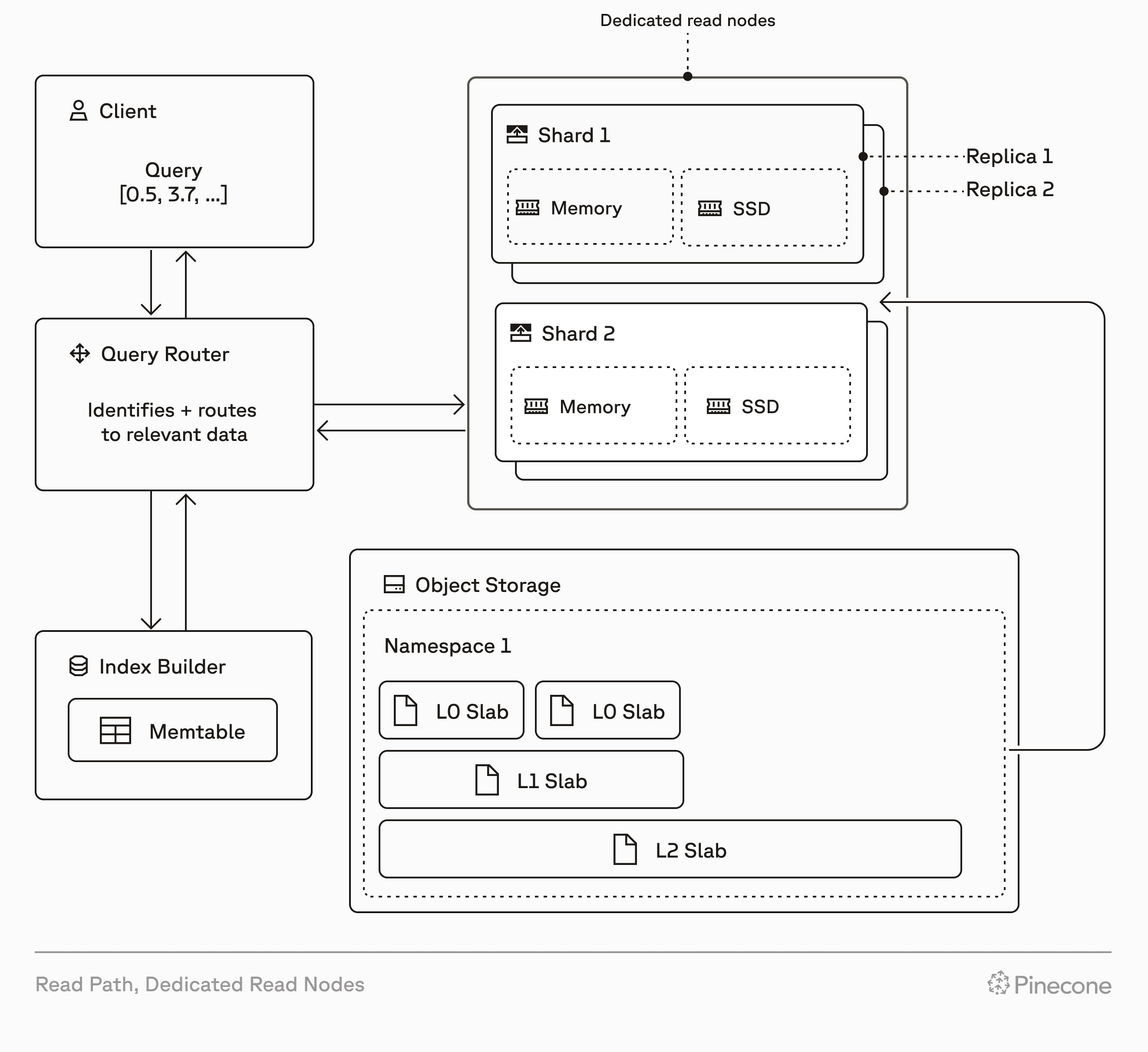
How Dedicated Read Nodes works
Dedicated Read Nodes scale along two dimensions: replicas and shards.
- Replicas add throughput and availability. Add replicas to handle more QPS and improve resilience, scaling QPS near-linearly.
- Shards expand storage capacity. Add shards to support more data as your index grows.
- No migrations required. Pinecone moves data and scales read capacity behind the scenes.
- Write behavior and limits remain the same as On-Demand.
Built for your most demanding use cases
Choose Dedicated Read Nodes when you need performance isolation, predictable low-latency under heavy load, linear scaling as data and QPS grow, and cost predictability at scale.
Common use cases are:
- Billion vector-scale semantic search with strict latency requirements.
- High-QPS recommendation systems (e.g., feeds, ads, marketplaces) that need steady, predictable throughput.
- Mission-critical AI services with hard SLOs.
- Large enterprise or multitenant platforms that require performance isolation to prevent one heavy workload from degrading another.
Performance at scale
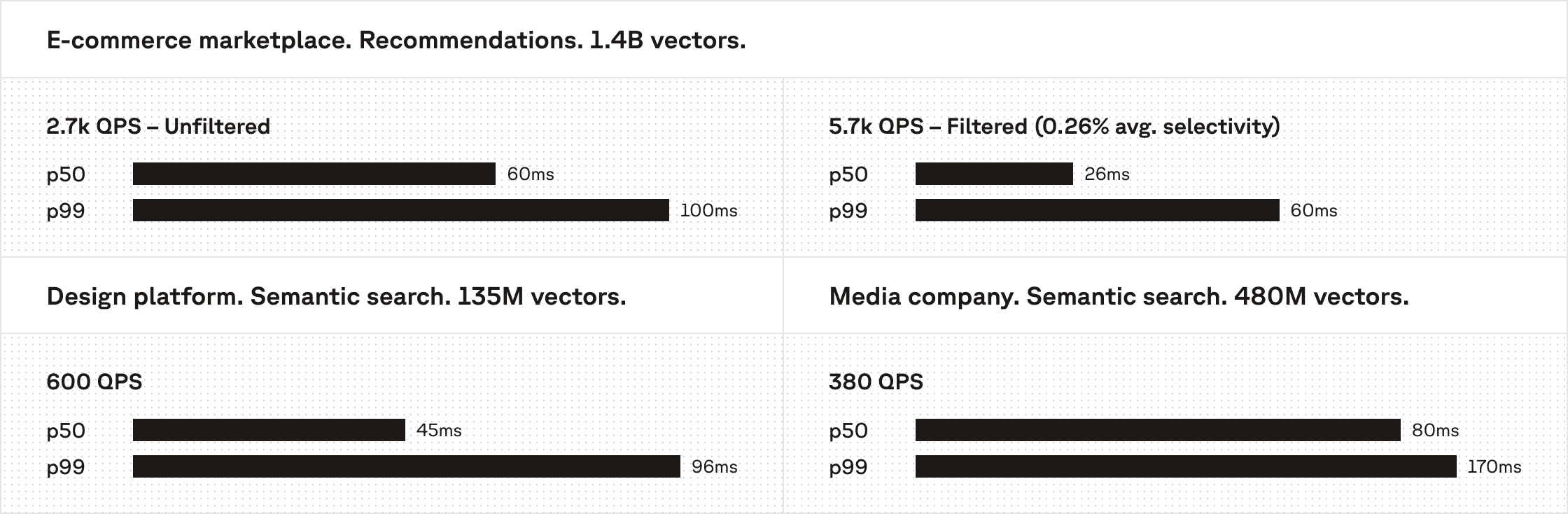
Dedicated Read Nodes are tailored for production workloads that demand consistent low-latency under real-world conditions.
One customer uses DRN to power metadata-filtered, real-time media search in their design platform. Across 135M vectors, they sustain 600 QPS with a P50 latency of 45ms and a P99 of 96ms in production. That same customer ran a load test by scaling their DRN nodes and reached 2200 QPS with a P50 latency of 60ms and a P99 of 99ms.
A second customer benchmarked DRN on 480M vectors, maintaining a P50 latency of 80ms and a P99 of 170ms at 380 QPS. At an even larger scale, another customer—a major e-commerce marketplace—benchmarked 1.4B vectors; their filtered recommendation use case achieved 5.7k QPS at 26ms p50 and 60ms p99. The cost-performance required to support these outcomes at scale is only possible with DRN's resource isolation and guaranteed warm data which prevents delays caused by cold fetches.
Because customers have the flexibility to choose between DRN and On-Demand services in Pinecone, depending on their workload and use case, they are able to achieve 20ms-100ms latencies on 100M to billion-vector datasets, with thousands of sustained QPS. This choice keeps costs both predictable and efficient without forcing a price-versus-performance tradeoff.
Getting started with Dedicated Read Nodes
To create an index that uses Dedicated Read Nodes, follow the steps below. When you create a DRN index, you’re provisioning real hardware — make sure you understand the associated costs.
- Sign in to Pinecone. Open the project where you’d like to create the index.
- In the Indexes section, click Create index. You’ll see this form:
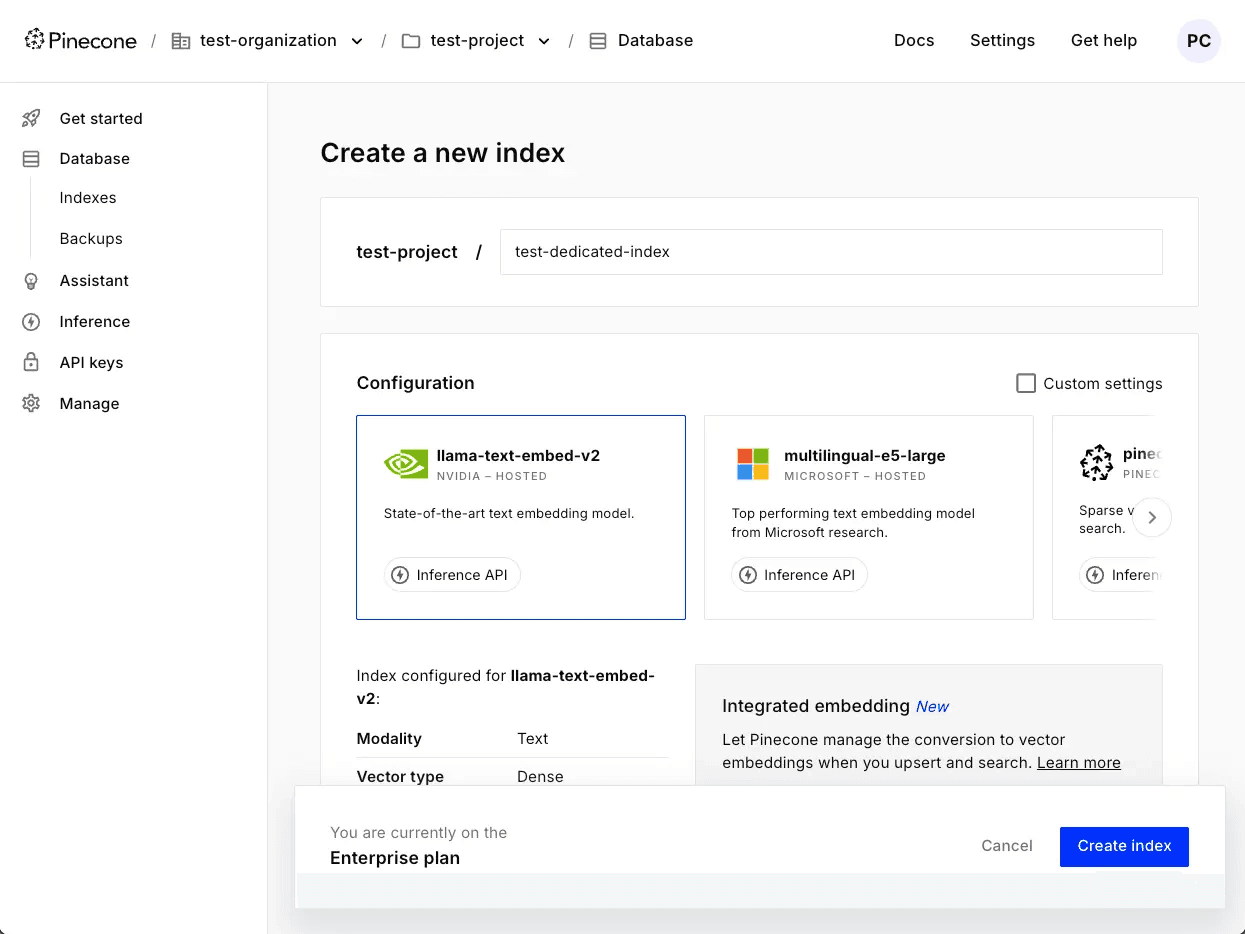
- Name your index.
- Configure the dimension and metric for your index’s embeddings. If you choose an embedding model hosted by Pinecone, these values are set automatically. Otherwise, you can check Custom settings and set them manually.
- When using an embedding model hosted by Pinecone, you can insert and search with text, and Pinecone generates embeddings for you. However, you’ll need to specify a Field map, which is the field in your data for which Pinecone should create embeddings.
- Otherwise, specify a vector type, dimension, and metric that make sense for your data and the model you’ll use to create embeddings.
- In the Capacity mode section, navigate to the Serverless tab:
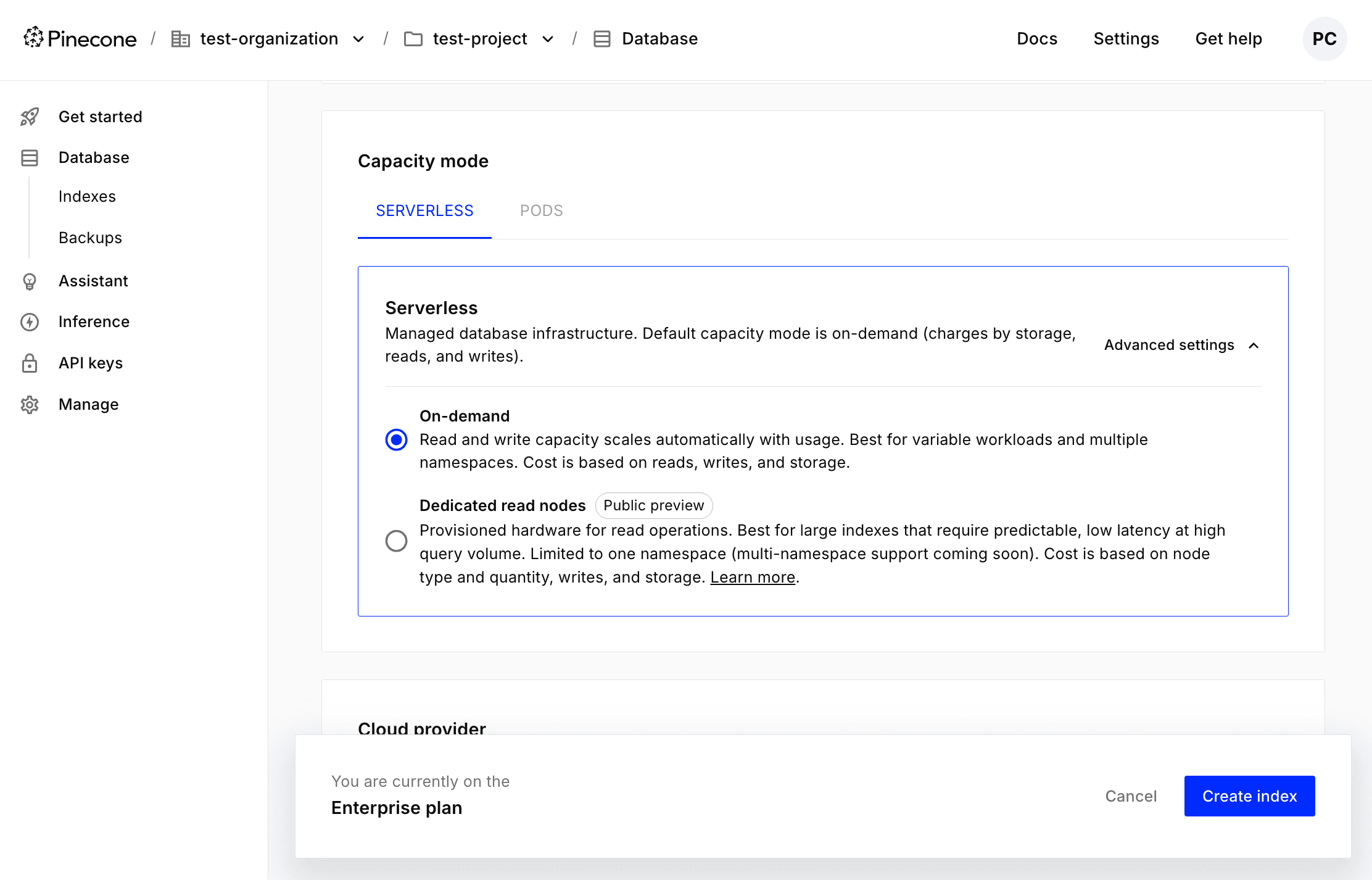
- Under Advanced settings, choose Dedicated read nodes. Then, provide the following configuration information:
- Node type: b1 or t1. Both types of nodes are suitable for large-scale, demanding workloads, but t1 nodes have more processing power and cache more data in memory, enabling lower query latency.
- Shards: Each shard provides 250 GB of storage, and data is divided among shards. To decide how many shards you’ll need, calculate the size of your index, and make sure to leave some room for growth. After creating a dedicated index, you can add or remove shards as needed.
- Replicas: Replicas duplicate the compute resources available to an index. Adding more of them can help reduce query latency. After creating a dedicated index, you can add or remove replicas as needed, too.
- Choose a cloud provider, region, and whether to enable deletion protection:
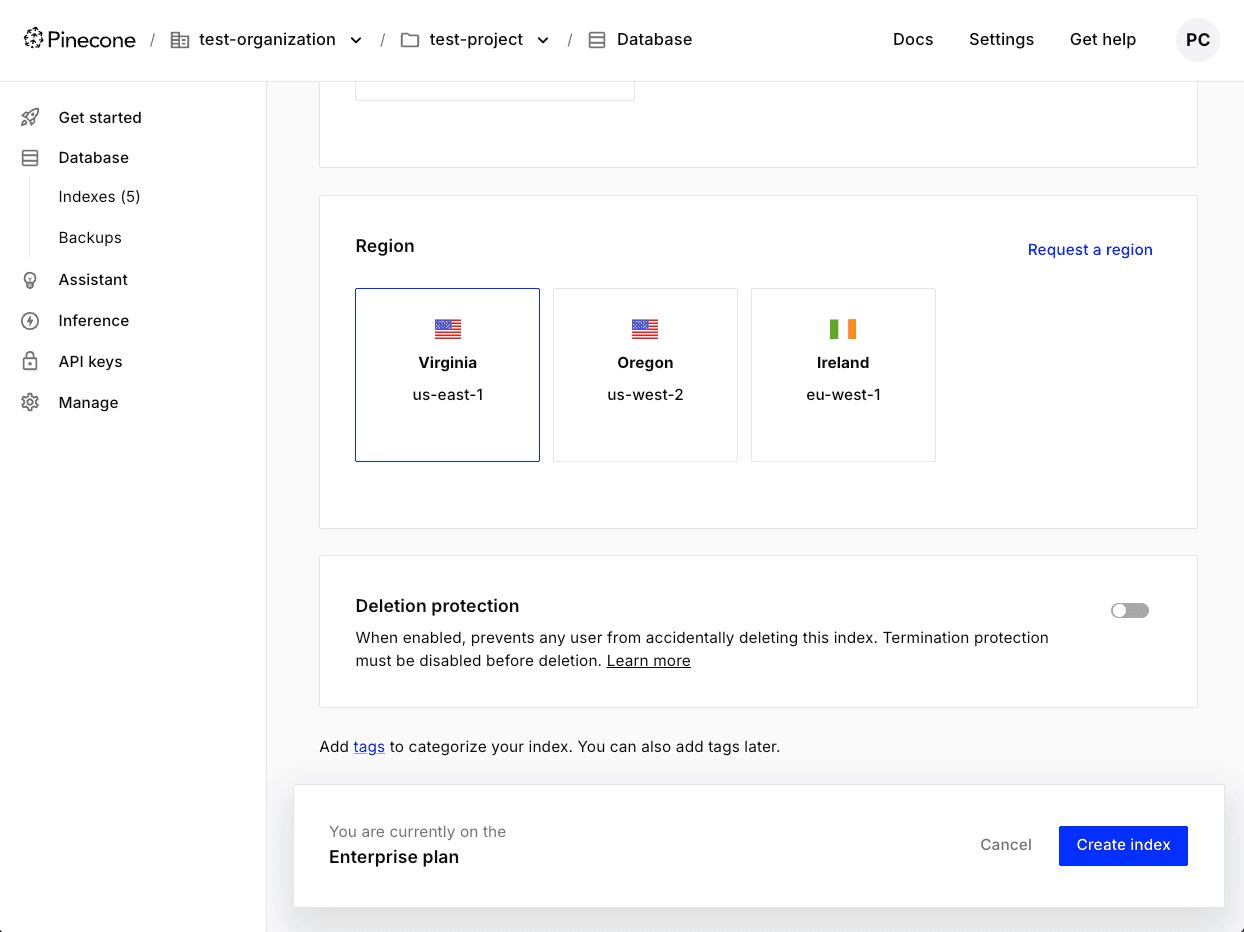
- Click Create index. You can start inserting and querying data quickly after creating the index, but it can take about 30 minutes for it to reach full read capacity.
You can also create a Dedicated Read Nodes index using Pinecone’s API. For details, see our documentation.
Migrating from On-Demand to DRN
To migrate an index from On-Demand to Dedicated Read Nodes, you can use Pinecone’s API. To learn how to do this, see Migrate from On-Demand to dedicated.
If you need help calculating the size of your index, deciding how many shards or replicas to use during migration, or have other questions about migrating from On-Demand to DRN, contact support.
Try Dedicated Read Nodes today
As workloads grow, most vector databases hit limits. With Dedicated Read Nodes, you control the limits. You get dedicated, provisioned read nodes and a warm data path for predictable low-latency, replicas to scale throughput, shards to grow storage, and hourly per-node pricing so costs stay predictable as you grow.
Dedicated Read Nodes are now available in Public Preview. Try them on your most demanding workloads and see how they perform. Learn more in our docs.
Was this article helpful?