Pinecone BYOC: Pinecone in your AWS, GCP, or Azure account, no vendor access

If you’re taking search, recommendations, or agents to production, you eventually hit the same checkpoint: security review.
When security blocks the knowledge layer, it slows everything down. Teams stay in pilot mode. Ownership gets muddy. “Quick fixes” like bolt-on stacks or partial self-hosting often create new problems, like higher operational burden and a bigger access surface area.
The cost shows up fast. Every week you’re stuck in security review is a week your AI features aren’t in production.
The blocker isn’t performance or features. It’s a single security requirement: no vendor access into your cloud account or cluster. What you need is a path to production that clears that bar without changing your delivery plan.
Pinecone Bring Your Own Cloud (BYOC), available now in public preview for all Enterprise users, brings Pinecone into your AWS, GCP, or Azure account with a zero-access operating model.
With BYOC, the Pinecone Database’s data plane runs inside your VPC. Your vectors are stored and queried there. Pinecone doesn’t need SSH, VPN, or inbound network access to your cloud account, VPC, Kubernetes cluster, nodes, or workloads. You don’t open inbound firewall ports for Pinecone to operate the system.
You still use the Pinecone control plane (API and console) for index lifecycle, auth, and usage visibility.
TL;DR
With BYOC, you get:
- Data plane in your cloud account: Vectors are stored and queried inside your VPC.
- Zero-access operations: Pinecone doesn’t need SSH, VPN, or inbound access paths into your VPC or cluster.
- Outbound-only operations: Components in your cluster pull queued operations over TLS and execute them locally.
- Auditable operations: Operations are represented as Kubernetes custom resources, so you can see what ran and when.
- Monitoring without data exposure: Only operational metrics and traces are sent. Your vectors, record metadata, and request payloads stay in your cloud account.
- Public or AWS PrivateLink/GCP PSC/Azure Private Link-only connectivity: Choose a public endpoint or disable public access and connect via AWS PrivateLink, GCP Private Service Connect (GCP PSC), or Azure Private Link.
- Same control plane workflow: Create, list, and delete indexes through the Pinecone API and console.
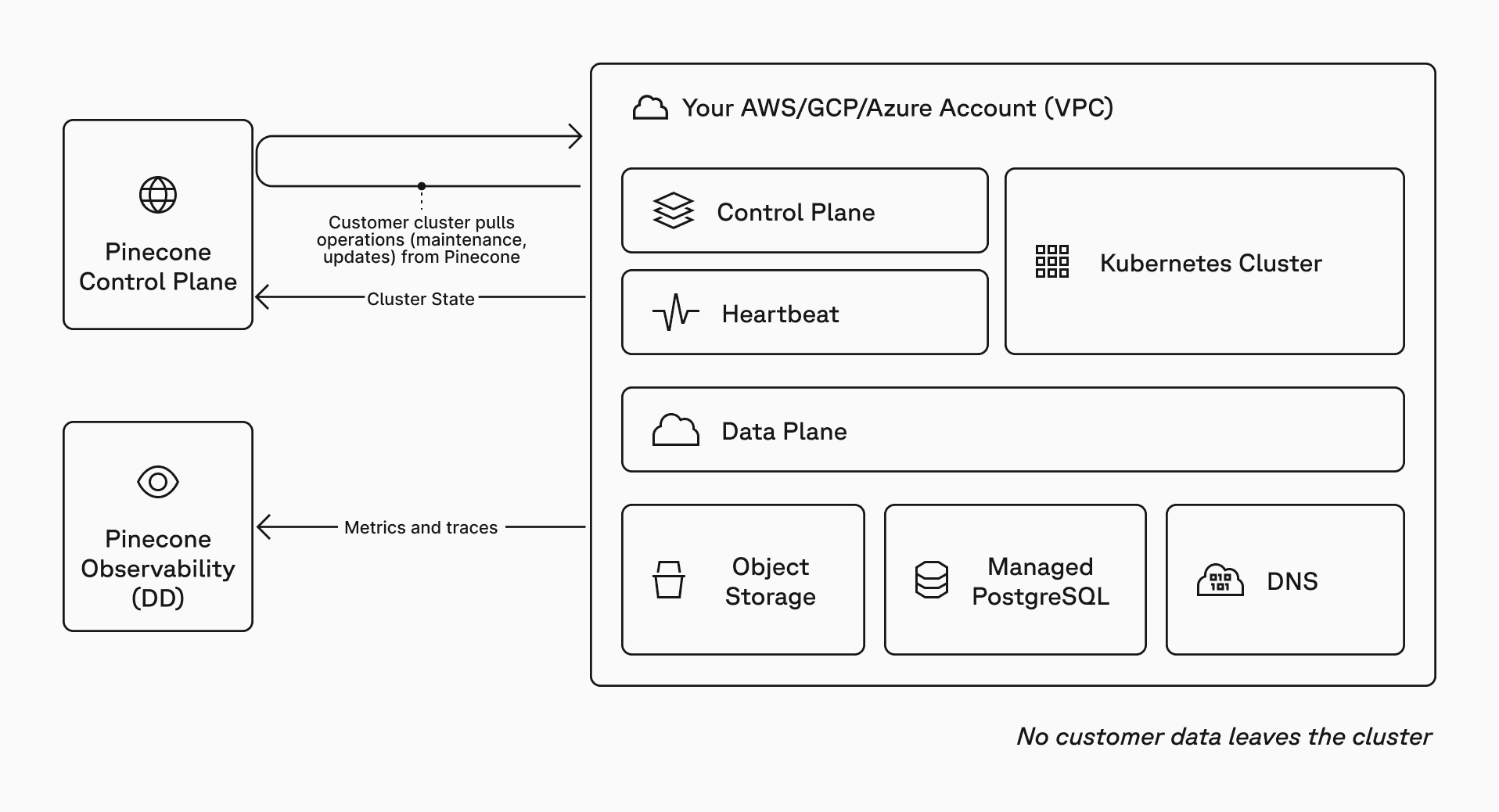
What is BYOC?
BYOC delivers uncompromising governance and safety for teams with the strictest requirements.
BYOC is Pinecone’s split-plane architecture applied to a zero-access enterprise security posture:
- Control plane (managed by Pinecone): Index lifecycle, authentication, user management, billing, and usage visibility. The control plane does not store or process your vectors.
- Data plane (hosted by you): Vector storage and query execution inside a dedicated VPC in your cloud account.
This keeps your data plane inside your security boundary while preserving the control plane experience your teams already use.
Why teams choose BYOC
When the point is to ship production AI without getting stuck in security review, “keep data in our cloud” is often not enough. The real requirement is usually: no external access paths into production, even for operations.
The usual options create costly failure modes:
- Managed service with vendor access: Faster to start, but can stall in security review and expand your third-party access surface area.
- Fully self-hosted: Clears the access line, but shifts reliability, upgrades, and incident response entirely onto your team.
BYOC combines managed operations with data plane isolation. You keep the data plane inside your cloud account. Operations execute inside your cluster. Pinecone does not need direct access to your infrastructure.
- Enterprise governance and safety: Vectors and query execution stay inside your cloud boundary. Operations are auditable, and responsibilities are clear.
- Faster path to production: You can meet strict access requirements without switching to a fully self-hosted model.
- Operational consistency: You keep the control plane workflow your teams already use, without introducing direct access paths into your infrastructure.
BYOC’s zero-access security model
BYOC is designed around a zero-access boundary. Pinecone does not need interactive access to your infrastructure to operate the data plane.
Zero-access means
- Pinecone does not need SSH, VPN, or inbound access to your cluster.
- You control cloud account boundaries, networking, and Kubernetes access.
- Operational changes run through explicit, software-mediated workflows.
Zero-access does not mean
- You lose the Pinecone control plane. You still use the API and console for index lifecycle, auth, and visibility.
- You do everything manually. Operations are still orchestrated through the control plane. Your cluster executes them locally.
- You have no support from Pinecone. We don’t have access to your cloud account or infrastructure, but we have visibility into your BYOC deployment via metrics and traces and are on-call for support.
How it works without direct access
BYOC separates control plane operations from data plane requests.
Control plane operations
Control plane operations – upgrades, scaling, maintenance, etc. – are queued by Pinecone and executed inside your environment using an outbound-only, pull-based model.
- Your Pinecone admin initiates a cluster operation (scale, upgrade, restart, etc.).
- The control plane queues operations for your environment.
- Components in your cluster pull pending operations and execute them locally.
- Your cluster reports health and state back to the control plane.
Data plane requests
Data plane requests are things your apps do every day: upsert, query, fetch, and other index operations. These requests go directly from your clients to the data plane running in your VPC.
- Your apps connect to the BYOC index endpoint.
- Requests are served by the data plane inside your account.
- Pinecone doesn't need network access into your VPC to serve data plane traffic.
Monitoring
For monitoring and support, the cluster sends operational metrics and traces to Pinecone’s observability stack – never vectors, record metadata, and request payloads.
The key point: control plane operations are pulled outbound, and data plane requests are served inside your VPC.
What leaves your cloud account (and what doesn’t)
Does not leave your cloud account:
- Vectors, metadata, and index contents.
- Query and upsert payloads.
- Customer data.
Can leave your cloud account:
- Operational metrics and traces (for example, CPU, memory, latency).
- Cluster health and operation status.
Deployment model
BYOC is deployed using a self-serve kit that fits standard platform workflows.
A typical rollout looks like this:
- Start in a non-production AWS, GCP, or Azure account that matches your production network and policy controls.
- Deploy with the BYOC self-serve kit and integrate it into CI/CD or GitOps flow.
- Promote the same deployment model to production.
The BYOC deployment step looks like this:
- Run an interactive setup wizard. It checks prerequisites and validates AWS/GCP/Azure quotas.
- The wizard generates a Pulumi project for your environment.
- You deploy into your cloud with pulumi up.
See the BYOC GitHub repository and documentation for more information.
Provisioning creates the data plane environment in your cloud account, including a dedicated VPC and an EKS/GKE/AKS cluster, plus supporting cloud services for storage, system state, and TLS/DNS.
Private connectivity options
You can choose the network posture that matches your environment:
- Public access enabled: connect using the standard index host URL.
- Public access disabled: connect only from within your VPC using AWS PrivateLink, GCP PSC, or Azure Private Link and the private host URL.
Control plane operations still work in either mode.
What’s available today
BYOC is available on AWS, GCP, and Azure for Enterprise users in public preview. In this release, BYOC supports:
- Single-namespace Dedicated Read Nodes (DRN) indexes
- Split control plane/data plane architecture
- Pull-based operations and upgrades
- Operational telemetry for monitoring
- Network access modes: public or AWS PrivateLink/GCP PSC/Azure Private Link-only
- Compatible with the Pinecone CLI
Some Pinecone capabilities that depend on Pinecone-hosted services outside your cloud account are not yet available in BYOC, such as:
- Assistant
- Inference
- Database On-Demand indexes
- DRN indexes with integrated embedding
See the BYOC documentation for more information.
Getting started
BYOC lets you meet the strictest security requirements without giving up managed infrastructure or slowing your path to production. BYOC is self-serve for Enterprise users in public preview. To deploy, start with the setup wizard in the BYOC GitHub repo, then follow the BYOC documentation. If you have any questions or need any assistance, contact your account team or send a request through our contact us form.
Was this article helpful?